The best Wi-Fi router for Xfinity is any good router paired with a DOCSIS 3.1 modem on Xfinity’s approved-device list, or, if you keep the Xfinity gateway, a router or mesh system connected to it with the gateway in bridge mode. The router itself does not need to be “Xfinity compatible”; the modem does. Picking the right combination depends on your plan speed, whether you have Xfinity Voice, and whether your plan already bundles the gateway.
Our top picks
 NETGEAR Nighthawk WiFi 7 Router
- FASTER, FARTHER, MORE RELIABLE WIFI: A dedicated tri-band…
- Pairs with your existing modem or gateway via…
- Download the free Nighthawk app on iOS or…
 NETGEAR Nighthawk WiFi 7 Router RS140
- FASTER, FARTHER, MORE RELIABLE WIFI: A dedicated dual-band…
- Pairs with your existing modem or gateway via…
- Download the free Nighthawk app on iOS or…
| Product | Key specs | |
|---|---|---|
| NETGEAR Nighthawk WiFi 7 Router | FASTER, FARTHER, MORE RELIABLE WIFI: A dedicated tri-band… Pairs with your existing modem or gateway via… Download the free Nighthawk app on iOS or… | Check price |
| NETGEAR Nighthawk WiFi 7 Router RS140 | FASTER, FARTHER, MORE RELIABLE WIFI: A dedicated dual-band… Pairs with your existing modem or gateway via… Download the free Nighthawk app on iOS or… | Check price |
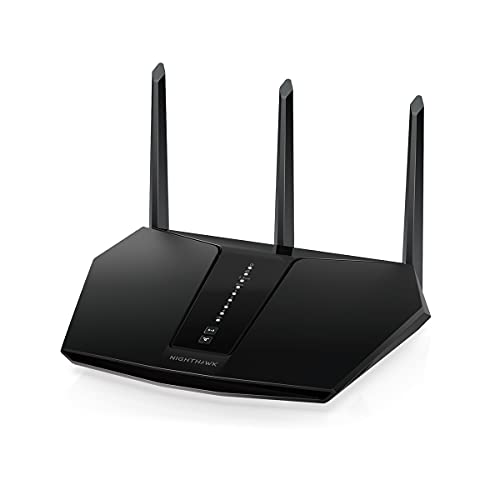 NETGEAR Nighthawk WiFi 6 Router | Check price | |
 NETGEAR Nighthawk WiFi 6 Router R6700AX | FAST, RELIABLE WIFI: Delivers fast, reliable WiFi across… Pairs with your existing modem or gateway via… Download the free Nighthawk app on iOS or… | Check price |
As an Amazon Associate we earn from qualifying purchases at no extra cost to you.
The two setups that work
| Setup | What you buy | Pros | Cons |
|---|---|---|---|
| Own modem + own router | DOCSIS 3.1 modem and a separate router or mesh | No gateway rental, full control, easy upgrades | Two devices to buy; Xfinity Voice needs a telephony modem |
| Xfinity gateway in bridge mode + own router | Only the router or mesh | Fastest plans supported, Xfinity handles modem issues | Rental or bundled cost, gateway Wi-Fi and xFi Pods disabled |
| Xfinity gateway alone | Nothing | Simplest | Limited settings, coverage limited to one box or xFi Pods |
Avoid the fourth option many people end up with by accident: the Xfinity gateway in normal mode with a second router behind it. That creates double NAT and two competing Wi-Fi networks, which shows up as strict NAT on consoles and dropped video calls.
Step 1: pick the modem by plan speed
Xfinity runs on DOCSIS cable. DOCSIS 3.0 modems are no longer a sensible purchase; buy DOCSIS 3.1. The modem’s Ethernet port is what most often caps your speed.
| Xfinity plan speed | Modem requirement | Example modems | Router WAN needed |
|---|---|---|---|
| Up to 300 Mbps | DOCSIS 3.1 | ARRIS SURFboard SB8200, Motorola MB8611 | 1 Gb |
| 300 Mbps to 1 Gbps | DOCSIS 3.1 | ARRIS SURFboard SB8200, NETGEAR CM1000 | 1 Gb |
| 1 Gbps to 1.2 Gbps | DOCSIS 3.1 with 2.5 Gb port | ARRIS SURFboard S33, Motorola MB8611 | 2.5 Gb |
| Multi-gig tiers | Often the Xfinity gateway is required | Xfinity gateway in bridge mode | 2.5 Gb or faster |
| Any plan with Xfinity Voice | Telephony-capable DOCSIS 3.1 modem | ARRIS SURFboard T25, or the Xfinity gateway | Plan dependent |
Xfinity’s approved list changes, and a modem must be on it for activation. Search the model on Xfinity’s device compatibility page before buying; if it is not listed, activation can fail even if the hardware is technically DOCSIS 3.1.
Step 2: pick the router by home and devices
Apartment or small home, plan up to 500 Mbps
A dual-band Wi-Fi 6 router in the AX1800 to AX3000 class, such as the TP-Link Archer AX55 or ASUS RT-AX58U, covers one floor well and costs far less than a year of equipment fees.
Medium home, gigabit plan
Choose a 4×4 Wi-Fi 6 or entry Wi-Fi 7 router with a 2.5 Gb WAN, such as the ASUS RT-AX86U Pro. The 2.5 Gb WAN matters if your modem has a 2.5 Gb port and your plan delivers slightly over a gigabit.
Large or multi-story home
Go mesh. eero Pro 6E, TP-Link Deco Wi-Fi 6E or Wi-Fi 7 kits, and NETGEAR Orbi systems all work behind any Xfinity modem. Put the main unit next to the modem and use Ethernet backhaul to satellites wherever possible.
Upload-heavy users
Cable upload is much slower than download on most Xfinity plans. If you stream, upload large files or work from home, QoS matters more than raw Wi-Fi speed. Routers with good adaptive QoS or smart queue management keep calls smooth while a backup uploads.
The cost math: rent or buy
Gateway rental fees vary by market and plan, but they commonly fall in the range of about $15 to $25 per month. Here is a simple worked example using $15 per month:
| Period | Rental cost at $15/month | Own modem + router (one-time) |
|---|---|---|
| 12 months | $180 | $250 to $400 for a mid-range pair |
| 24 months | $360 | Same one-time cost |
| 36 months | $540 | Same one-time cost |
The break-even point is usually somewhere between 18 and 30 months. One important exception: some Xfinity plans bundle the gateway and unlimited data into the plan price. If returning the gateway would cost you unlimited data or raise the plan price, the math changes, so read your plan details before ordering hardware.
Setting up your own modem and router
- Connect the modem directly to the main coax outlet. Avoid unnecessary splitters, which lower signal levels.
- Activate the modem through the Xfinity app or activation page using its MAC address. Keep the old gateway connected until the new modem is online.
- Connect the router’s WAN port to the modem’s Ethernet port, using the 2.5 Gb port if both have one.
- Power-cycle in order: modem first, wait until it is fully online, then the router.
- Return the gateway to stop rental charges, and keep the return receipt.
Using bridge mode on the Xfinity gateway
- Sign in to the gateway at 10.0.0.1 or open the Xfinity app.
- Enable bridge mode. The gateway’s Wi-Fi turns off and it passes the public IP to the first device on its Ethernet port.
- Connect your router’s WAN port to the gateway’s fastest Ethernet port and reboot the router.
- Check the router’s WAN status shows a public IP rather than 10.0.0.x.
Bridge mode disables xFi Pods and the gateway’s built-in security and parental-control features. Your router now handles all of that.
Common mistakes
- Buying a DOCSIS 3.0 modem to save money. It limits speed on modern plans and may not stay supported.
- Ignoring Xfinity Voice. A data-only modem will not run your home phone line.
- Paying for multi-gig and using a 1 Gb modem port. The modem’s port caps every device behind it.
- Testing speed on Wi-Fi. Test from a wired computer first to separate modem issues from Wi-Fi issues.
- Forgetting the router’s own updates. With your own gear, firmware updates are your job.
More from Amazon
Programs that pair well with the guide above. Offers and eligibility are set by Amazon and may change.
Free shipping on eligible items, Prime Video and more. Eligible new members can start with a free trial.
Start a Prime free trialAd-free music streaming. Eligible new subscribers can start with a free trial.
Try Music Unlimited freeA Prime membership for ages 18-24 with a trial period. Eligibility is set by Amazon.
See Prime for Young AdultsAudiobooks and podcasts to listen to on the go. Eligible new members can start with a free trial.
Try Audible freeAs an Amazon Associate we earn from qualifying purchases.