Our Short List of 3

- Best for: high school and early college students whose teachers demonstrate on a TI-84.
- Display: 320 × 240 pixel full-color backlit LCD
- Battery: rechargeable, 1 lithium battery included
- Connectivity: USB link to computers running TI Connect CE software
- Model number: 84PLCE/TBL/1L1/AH

- Best for: calculus, physics, and engineering students who need symbolic math and exam rules permit CAS.
- Algebra system: built-in Computer Algebra System (CAS) for symbolic math
- Software: TI-Nspire CX II Student Software for PC and Mac included
- Display: full-color backlit display
- Model number: NSCXCAS2/TBL/2L1/A
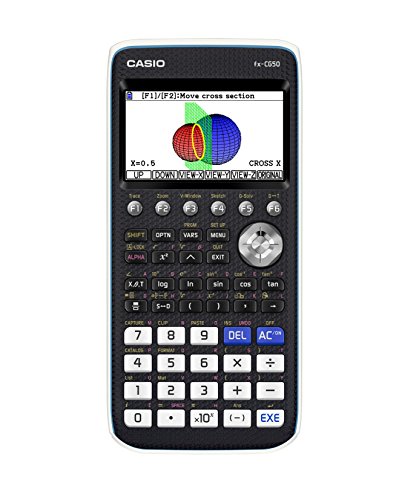
- Best for: students who want color and 3D graphing in a non-CAS, exam-legal package.
- Display: 384 × 216 pixel high-resolution color LCD
- Graphing: four preinstalled 3D graph types, including sphere, cylinder, plane and line
- Memory: 16 MB flash storage memory
- Programming: MicroPython built in
All 5 Picks at a Glance
| Product | Specs | Action |
|---|---|---|
| Texas Instruments TI-84 Plus CE Color Graphing Calculator, Black |
| Check price on Amazon |
| Texas Instruments TI-Nspire CX II CAS Color Graphing Calculator with Student Software |
| Check price on Amazon |
| Casio Prizm fx-CG50 Color Graphing Calculator |
| Check price on Amazon |
 Casio fx-9750GIII Graphing Calculator, White |
| Check price on Amazon |
 Texas Instruments TI-84 Plus Graphics Calculator, Black |
| Check price on Amazon |
Key takeaways
- Compare the best graphing calculators for school and exams, from the TI-84 Plus CE and TI-Nspire CX II CAS to Casio color and budget picks with Python.
Choosing a graphing calculator is less about raw power than about fit. The right model has to be legal in your exam room, match the keystrokes your teacher demonstrates in class, and survive several school years of daily use. A CAS model that breezes through calculus homework is worthless if the ACT bans it, and a bargain calculator becomes expensive if none of your course materials explain its menus.
This guide serves high school students buying their first graphing calculator, college students moving into calculus and engineering, and parents who want one purchase to last. The five picks come from current Amazon listings by Texas Instruments and Casio, spanning color and monochrome screens, CAS and non-CAS models, and rechargeable and battery-powered designs.
Quick Picks
As an Amazon Associate we earn from qualifying purchases
| Product | Best for | Key spec from title |
|---|---|---|
| Texas Instruments TI-84 Plus CE, Black | Most high school and college classes | Full-color backlit display |
| Texas Instruments TI-Nspire CX II CAS | Advanced math and engineering courses | Computer Algebra System (CAS) |
| Casio Prizm fx-CG50 | Color 3D graphing without a CAS | 3D graphing on a color LCD |
| Casio fx-9750GIII, White | Tight budgets that still need Python | Natural Textbook Display with Python |
| Texas Instruments TI-84 Plus, Black | A proven monochrome classroom standard | More than a dozen preloaded apps |
How to Choose
Check the Exam Rules Before Anything Else
Every model in this guide is built for standardized tests, but the details matter. The SAT permits all five picks here, while the ACT allows the non-CAS models and bans CAS calculators such as the TI-Nspire CX II CAS. AP exams vary by subject, and individual teachers often keep their own approved lists for classroom tests. Before you buy, find your exam’s calculator policy and your course syllabus, and match the model to the strictest room it will enter. A calculator you cannot bring into the test that counts is the wrong calculator, no matter how capable it is.
Decide Whether You Need a CAS
A Computer Algebra System works symbolically: it can expand, factor, and solve equations with variables, not just numbers. That power helps in calculus, linear algebra, and engineering courses, where checking symbolic work speeds up learning. The trade-off is permission, since CAS models are barred from the ACT and some classroom exams. If your path stops at precalculus or statistics, a non-CAS model covers the syllabus and stays legal everywhere. If you are heading into multi-year calculus and engineering sequences, a CAS model like the TI-Nspire CX II CAS earns its keep as a study tool.
Weigh the Screen Against Battery Life
Color screens make overlapping graphs, inequalities, and geometry far easier to read, and the TI-84 Plus CE and Casio fx-CG50 both render plots in full color. Monochrome models such as the TI-84 Plus and fx-9750GIII look plainer, but their high-contrast displays stay readable under bright classroom lighting. Power matters just as much. Rechargeable models need a charging habit and a cable before exam week, while AAA-powered models run for months and recover from a dead battery with a quick swap. Pick the combination that matches how reliably you will maintain it.
Follow Your Classroom’s Ecosystem
Most American math classrooms run on Texas Instruments. Textbooks print TI-84 keystroke sequences, teachers project TI menus, and classmates can show you the exact buttons to press. Choosing the TI-84 Plus CE means every tutorial, worksheet, and video lesson you find will match your device. Casio’s fx-CG50 and fx-9750GIII do the same math, often faster, but their icon menus and key layouts differ, so you will translate instructions as you go. If your teacher demonstrates on a Casio or your school is brand-neutral, that translation cost disappears; if not, weigh it honestly.
The 5 Best Options
Texas Instruments TI-84 Plus CE Color Graphing Calculator, Black
- Best for: high school and early college students whose teachers demonstrate on a TI-84.
- Display: 320 × 240 pixel full-color backlit LCD
- Battery: rechargeable, 1 lithium battery included
- Connectivity: USB link to computers running TI Connect CE software
- Model number: 84PLCE/TBL/1L1/AH
high school and early college students whose teachers demonstrate on a TI-84.
Amazon lists several near-identical variants, including a CE-T Python Edition and Renewed units, so confirm the exact variant and condition on the listing before ordering.
The TI-84 Plus CE is the default recommendation for most students because it is the calculator their classroom already speaks. Its color screen separates overlapping graphs cleanly, the rechargeable battery removes the mid-semester battery scramble, and the slim body fits a pencil case. It covers algebra through AP Statistics and introductory calculus, and because it is permitted on the SAT, ACT, and AP exams, one purchase can carry a student from middle school into college without a second thought about legality or lesson compatibility.
Texas Instruments TI-Nspire CX II CAS Color Graphing Calculator with Student Software
- Best for: calculus, physics, and engineering students who need symbolic math and exam rules permit CAS.
- Algebra system: built-in Computer Algebra System (CAS) for symbolic math
- Software: TI-Nspire CX II Student Software for PC and Mac included
- Display: full-color backlit display
- Model number: NSCXCAS2/TBL/2L1/A
calculus, physics, and engineering students who need symbolic math and exam rules permit CAS.
the ACT and some classroom exams ban CAS calculators outright, so confirm this model is allowed in every room where you plan to use it.
The TI-Nspire CX II CAS is the pick for students whose math is getting serious. Its Computer Algebra System manipulates symbols, so it can verify factorizations, derivatives, and equation solutions while you learn them, and the included Student Software mirrors the handheld on a PC or Mac for working through problem sets on a bigger screen. The document-style interface takes longer to learn than a TI-84, but for calculus, physics, and engineering tracks it is the most capable classroom-legal tool here, provided your exams allow CAS.
Casio Prizm fx-CG50 Color Graphing Calculator
- Best for: students who want color and 3D graphing in a non-CAS, exam-legal package.
- Display: 384 × 216 pixel high-resolution color LCD
- Graphing: four preinstalled 3D graph types, including sphere, cylinder, plane and line
- Memory: 16 MB flash storage memory
- Programming: MicroPython built in
students who want color and 3D graphing in a non-CAS, exam-legal package.
it runs on disposable AAA batteries rather than a rechargeable pack, and its menus differ from TI-based lessons, so check your teacher’s preference first.
The fx-CG50 is Casio’s answer to the TI-84 Plus CE, and in several ways it out-specs it: a sharp color display, preinstalled 3D graphing, and fast plotting, all without a CAS, so it stays legal on the ACT. The icon-based menu is logical once learned, and MicroPython support adds real programming for STEM students. It suits students whose schools are not locked into TI lessons and who want color and 3D visualization for geometry, precalculus, and science courses at a level the monochrome models cannot match.
Casio fx-9750GIII Graphing Calculator, White
- Best for: budget-conscious students who need full graphing and Python for STEM courses.
- Display: monochrome Natural Textbook Display
- Functions: more than 2,900 functions
- Memory: 3 MB flash memory
- Programming: MicroPython and Casio Basic
budget-conscious students who need full graphing and Python for STEM courses.
this listing is the white colorway, and the featured offer on it changes over time, so confirm a new unit is available from a current offer before you check out.
The fx-9750GIII is the budget pick that refuses to feel like one. Its monochrome Natural Textbook Display formats fractions, roots, and integrals the way they appear in your book, it packs more than 2,900 functions, and it even runs MicroPython for introductory programming. For pre-algebra through AP Statistics it covers the syllabus at a fraction of the color models’ cost, and its plain screen and AAA batteries keep it simple to own. Students in TI-centric classrooms will translate some instructions, but the savings buy a lot of patience.
Texas Instruments TI-84 Plus Graphics Calculator, Black
- Best for: students in classrooms standardized on the original TI-84 Plus and buyers who prefer a simple monochrome tool.
- Display: 96 × 64 pixel monochrome LCD
- Apps: more than a dozen preloaded apps, including Cabri Jr., Conic Graphing and Inequality Graphing
- Power: 4 AAA batteries
- Connectivity: USB cable included for computer linking
students in classrooms standardized on the original TI-84 Plus and buyers who prefer a simple monochrome tool.
many listings for this model are Renewed or reconditioned units, so read the condition line carefully if you want a brand-new calculator.
The original TI-84 Plus remains on sale because it still does the job. Its monochrome screen and familiar keypad are the reference point for a generation of textbooks, and the preloaded apps cover geometry, conics, and probability simulations for high school math and science. It is slower and plainer than the CE, and it runs on AAA batteries, but schools that standardized on it years ago keep mountains of matching lesson material. For a student in one of those classrooms, or a household buying a second calculator, it is a safe, well-documented choice.
Which One Fits Your Situation
Your Teacher Demonstrates Every Lesson on a TI-84
Buy the TI-84 Plus CE. Every worksheet keystroke, projected menu, and homework video will match what is in your hand, and its color screen and rechargeable battery are genuine quality-of-life upgrades over the original. If your school’s materials specifically target the older model and budgets are tight, the monochrome TI-84 Plus is the fallback that still speaks the same language.
You Are Heading Into Calculus and Engineering
Choose the TI-Nspire CX II CAS if your exams allow it. Symbolic algebra changes how you study: you can check a factorization or an integral instantly and spend your time on concepts instead of arithmetic slips. The included computer software also makes long problem sets easier to review. Just keep a non-CAS backup plan for any test, like the ACT, that bans CAS models.
Your Budget Is Firm but the Course List Is Long
The Casio fx-9750GIII covers pre-algebra through AP Statistics, adds Python, and costs far less than the color models. The compromise is a monochrome screen and Casio’s menu layout. If your teacher posts Casio-friendly materials or you are comfortable learning from the manual and online guides, it is the strongest value in this roundup by a wide margin.
You Want Color and 3D Without a CAS
Pick the Casio fx-CG50. Its color display and preinstalled 3D graphing make geometry and precalculus genuinely easier to visualize, and because it has no CAS it stays legal on the ACT and other restrictive exams. It is the natural upgrade path for students who like the fx-9750GIII’s approach but want the modern screen.
Common Mistakes
- Buying a CAS calculator for an exam that bans it, especially the TI-Nspire CX II CAS for the ACT.
- Ordering a Renewed or reconditioned unit by mistake because the listing title looked identical to the new one.
- Ignoring which brand your teacher uses, then struggling to follow keystroke-by-keystroke lessons on a different menu system.
- Paying extra for color screens and advanced features that your actual courses never ask for.
- Letting AAA batteries die during exam week instead of keeping a spare set in your bag.
Frequently Asked Questions
Are graphing calculators allowed on the SAT and ACT?
The SAT permits every model in this guide. The ACT is stricter: it allows the TI-84 Plus CE, TI-84 Plus, and both Casio models, but it prohibits calculators with a Computer Algebra System, which rules out the TI-Nspire CX II CAS. AP exams sit in between and vary by subject, so always check the current policy for your specific test before buying.
What does CAS mean, and do I need one?
CAS stands for Computer Algebra System. A CAS calculator manipulates symbols, so it can factor expressions, solve for variables, and differentiate functions exactly instead of only giving decimal answers. Most high school students never need it. It becomes valuable in calculus and engineering courses, but its exam restrictions mean it should be a deliberate purchase, not a default upgrade.
Should I choose the TI-84 Plus CE or the older TI-84 Plus?
For most buyers, the CE is the better purchase: its color screen separates graphs clearly, the rechargeable battery is more convenient, and it is noticeably slimmer. The older TI-84 Plus still makes sense when a school’s lessons are written for it or when you find a new unit at a much lower price. Both are exam-legal and teach the same core skills.
Which of these calculators can run Python?
Both Casio models list MicroPython in their specifications, so the fx-CG50 and fx-9750GIII can run Python programs directly on the handheld. Texas Instruments sells Python capability in specific variants such as the TI-84 Plus CE-T Python Edition, which is a separate listing from the standard CE above. If Python matters for a computer science class, confirm the exact variant name on the listing before ordering.
More from Amazon
Programs that pair well with the guide above. Offers and eligibility are set by Amazon and may change.
Free shipping on eligible items, Prime Video and more. Eligible new members can start with a free trial.
Start a Prime free trialAd-free music streaming. Eligible new subscribers can start with a free trial.
Try Music Unlimited freeA Prime membership for ages 18-24 with a trial period. Eligibility is set by Amazon.
See Prime for Young AdultsAudiobooks and podcasts to listen to on the go. Eligible new members can start with a free trial.
Try Audible freeAs an Amazon Associate we earn from qualifying purchases.