
Key takeaways
- Best Wi-Fi 6 Router for Most Homes — from the FAQ on whether Wi-Fi 7 is worth it, for readers on a slower plan.
- Wi-Fi 7 vs. Wi-Fi 6: Which Should You Buy? — from “How to Choose,” for readers who want the full standard comparison.
- Best Mesh Wi-Fi System for Large Homes — from the coverage section, for readers whose home is too large for a single router.
The best Wi-Fi 7 router under $300 for most homes is the TP-Link Archer BE550. It is a tri-band router with a 6 GHz band, Multi-Link Operation (MLO), and five 2.5 Gbps ports. That covers what matters most at this price: a clean, fast band for new phones and laptops, and wired ports that do not cap a gigabit or 2.5 Gbps plan.
It is not right for everyone. Multi-gigabit fiber, a large home, or a VPN-heavy home office may call for a different pick below — still under $300. These five routers were checked against Amazon US listings in November 2026. Prices change often, so treat any price here as a snapshot. Check the current price on Amazon before you buy.
Quick Picks
| Product | Best for | Key specs | Price note |
|---|---|---|---|
| TP-Link Archer BE550 | Most homes | Tri-band BE9300, 6 GHz, 5 × 2.5G, 2,000 sq ft | Around $200 in Nov 2026; check current price |
| TP-Link Archer BE600 | Multi-gig fiber, larger homes | Tri-band BE9700, 6 GHz, 1 × 10G + 4 × 2.5G, 2,600 sq ft | List $249.99; seen at $189.98 in Oct 2026 |
| ASUS RT-BE92U | ASUS fans, advanced firmware | Tri-band BE9700, 6 GHz, 1 × 10G + 4 × 2.5G, 2,500 sq ft | Around $264–$290 in Nov 2026; check current price |
| ASUS RT-BE58U | VPN and families | Dual-band BE3600, 1 × 2.5G, AiProtection Pro, dual-WAN | Around $135 in Nov 2026; check current price |
| TP-Link Archer BE230 | Budget upgrade | Dual-band BE3600, 2 × 2.5G, 2,000 sq ft, 60 devices | Seen at $79.98–$98 in Nov 2026; check current price |
How to Choose a Wi-Fi 7 Router Under $300
Do not buy on the combined speed number alone. BE3600, BE9300, and BE9700 add the maximum speed of every band at once; no single device can use all of it. Use the rating to compare routers in the same class, then check bands, ports, and coverage.
Tri-band vs. dual-band. Tri-band adds a 6 GHz band. It is less crowded than 5 GHz, supports wider 320 MHz channels, and is where new Wi-Fi 7 phones and laptops are fastest. If you have Wi-Fi 7 devices and work, stream, or game near the router, tri-band is worth paying for. Dual-band is reasonable for a small home on a 1 Gbps or slower plan, but there is no 6 GHz lane to move to when 5 GHz gets busy.
MLO and 320 MHz. MLO lets a Wi-Fi 7 device use two bands at once, which helps latency stay steadier when the network is busy. Wider 320 MHz channels on 6 GHz raise peak speeds, but only close to the router. All five routers here support MLO and 4K-QAM; the tri-band models also support 320 MHz. Do not expect rated speeds in real use — a BE9300 router will not deliver 9.3 Gbps to one laptop.
Coverage. Manufacturer figures are best-case estimates. Up to 2,000 sq ft suits a flat or small house if the router sits near the centre. At 2,500–2,600 sq ft, thick walls and multiple floors will still leave weak spots. For larger homes, choose a router with mesh expansion — TP-Link EasyMesh or ASUS AiMesh — so you can add a node later. Place the router in the open, at waist to chest height, away from metal cabinets.
Ports. Many Wi-Fi 7 routers still ship with mostly 1 Gbps LAN ports, which cap a wired PC or NAS at 1 Gbps. The right floor for most buyers is a 2.5 Gbps WAN port if the plan is over 1 Gbps, and at least one 2.5 Gbps LAN port. A 10 Gbps port helps only if the plan is faster than 2.5 Gbps or you move large files between wired devices.
Future-proofing. A router under $300 is future-proof enough with tri-band Wi-Fi 7, 6 GHz, MLO, 2.5 Gbps WAN and LAN ports, WPA3, and a manufacturer that still issues firmware updates.
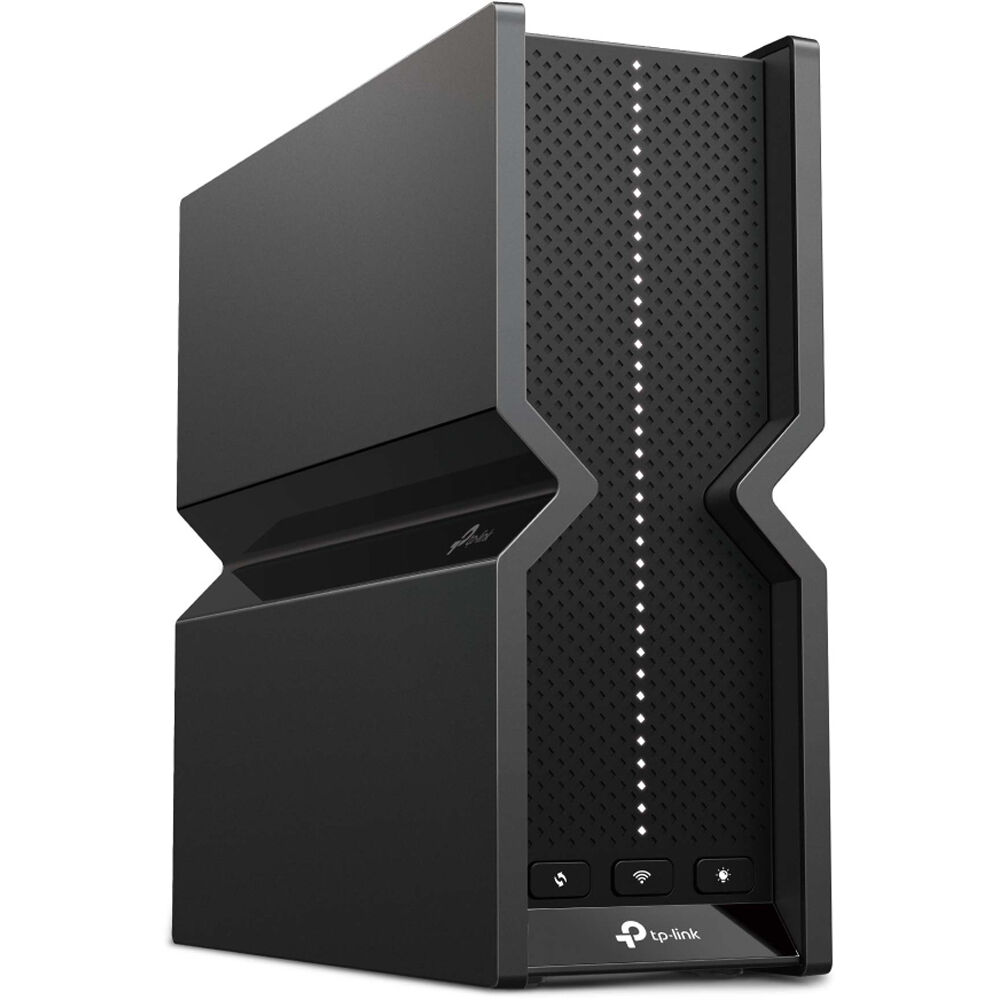
1. TP-Link Archer BE550 — Best Overall
Specs: Tri-band Wi-Fi 7 BE9300 — 5,760 Mbps on 6 GHz, 2,880 Mbps on 5 GHz, 574 Mbps on 2.4 GHz. Ports: 1 × 2.5 Gbps WAN, 4 × 2.5 Gbps LAN, 1 × USB 3.0. Coverage: up to 2,000 sq ft. Features: MLO, 320 MHz channels, EasyMesh, HomeShield, VPN client and server.
Every Ethernet port runs at 2.5 Gbps, so a 2 Gbps connection, a desktop, a NAS, and a console are not forced down to 1 Gbps. The 6 GHz band is genuine, and EasyMesh lets you add a node later. HomeShield covers basic security free; Pro is a paid add-on.
Pros: True tri-band Wi-Fi 7 with a usable 6 GHz band; five 2.5 Gbps ports; MLO and EasyMesh included.
Cons: No 10 Gbps port, so wired speed caps at 2.5 Gbps; 2,000 sq ft rating may need a node in large homes; HomeShield Pro needs a subscription.
Best for: Most homes with a 1 Gbps or 2 Gbps plan, several Wi-Fi 7 devices, and mixed wired and wireless use.
Check price on Amazon: TP-Link Archer BE550
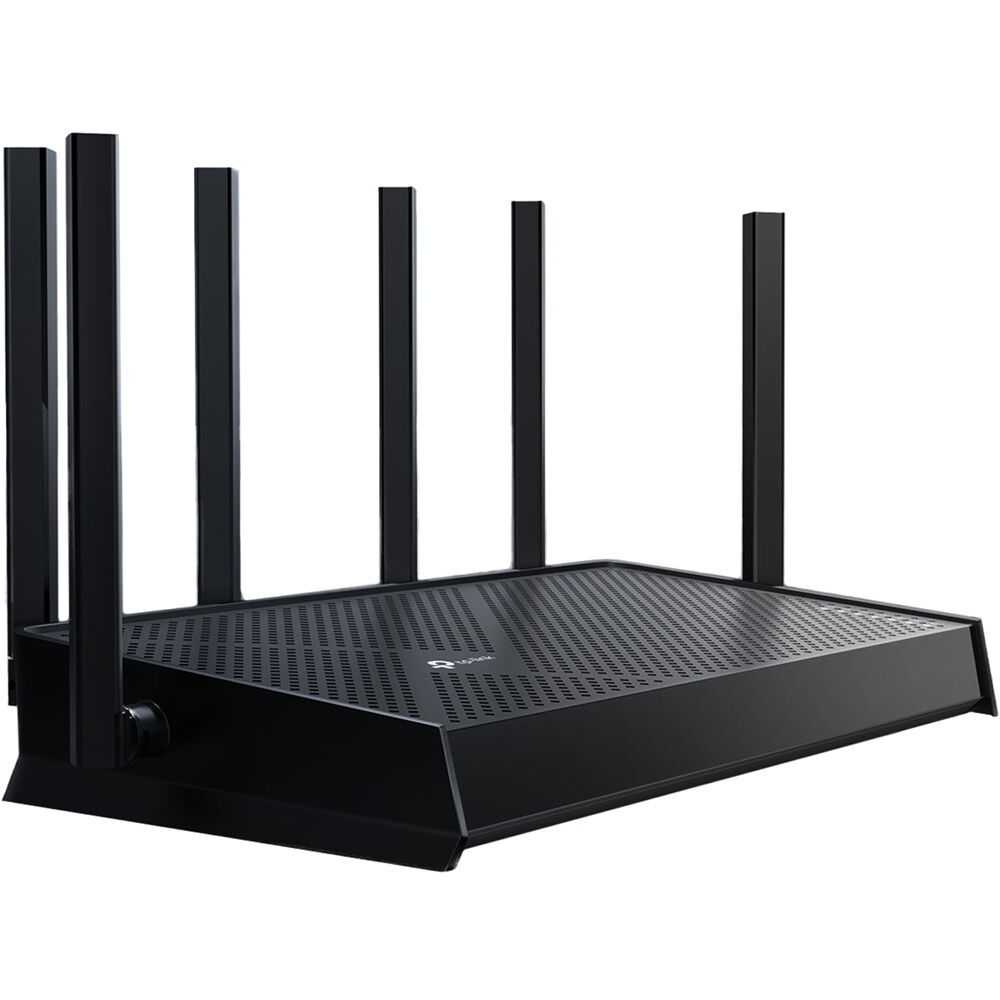
2. TP-Link Archer BE600 (BE9700) — Best for Multi-Gig Fiber and Larger Homes
Specs: Tri-band Wi-Fi 7 BE9700 — 5,765 Mbps on 6 GHz, 2,882 Mbps on 5 GHz, 1,032 Mbps on 2.4 GHz. Ports: 1 × 10 Gbps WAN/LAN, 1 × 2.5 Gbps WAN/LAN, 3 × 2.5 Gbps LAN, 1 × USB 3.0. Coverage: up to 2,600 sq ft, up to 120 devices. Features: MLO, 320 MHz channels, EasyMesh, HomeShield, VPN.
The BE600 is the step up from the BE550 for a faster plan or more space. Its 10 Gbps port matters if fiber is 3 Gbps or faster — the BE550 would cap you at 2.5 Gbps. Price has moved a lot: seen at $189.98 on Amazon in October 2026, then back at its $249.99 list price in November 2026 research.
Pros: 10 Gbps WAN/LAN port for multi-gigabit fiber; tri-band BE9700 with 6 GHz; larger coverage rating than the BE550.
Cons: More expensive than the BE550, and the price moves often; the 10 Gbps port is wasted on a 1 Gbps plan.
Best for: Homes with a 2 Gbps or faster fiber plan, a NAS or workstation that benefits from 10 Gbps, or a larger home.
Check price on Amazon: TP-Link Archer BE600
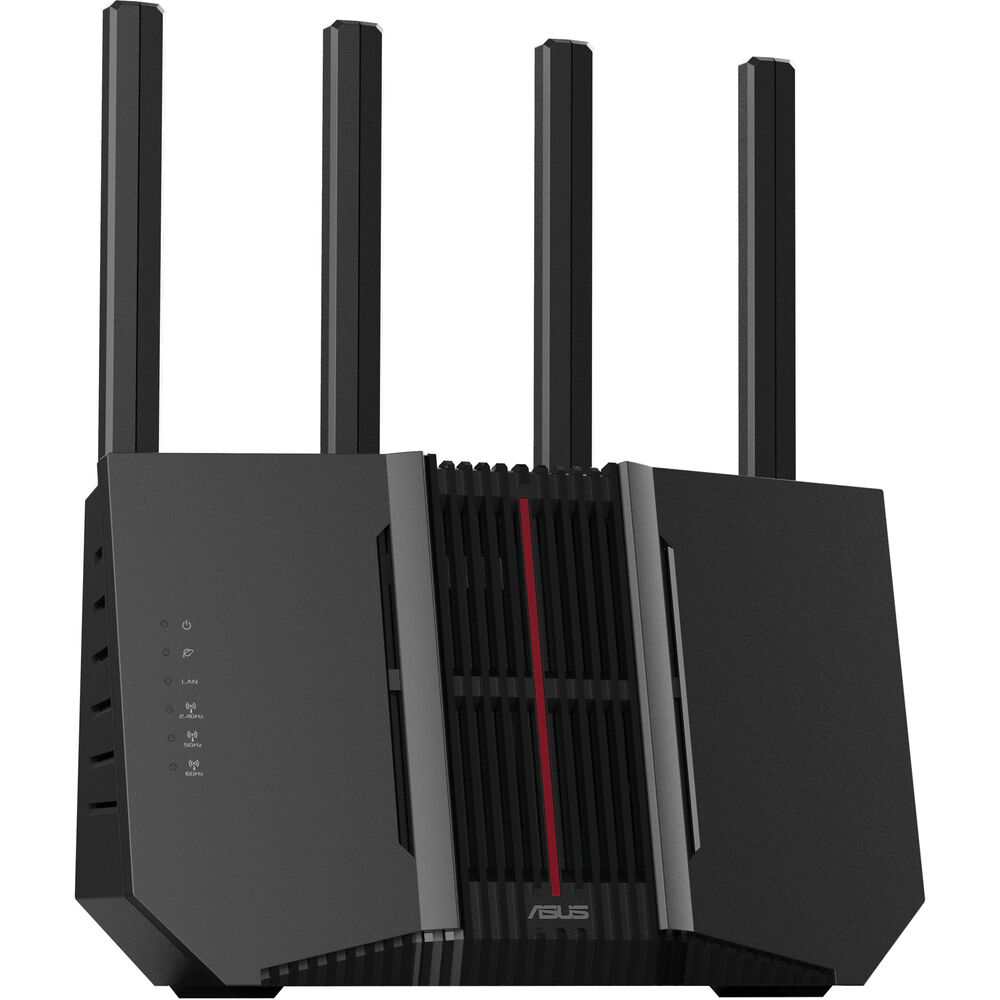
3. ASUS RT-BE92U — Best ASUS Tri-Band Router
Specs: Tri-band Wi-Fi 7 BE9700 — 5,764 Mbps on 6 GHz, 2,882 Mbps on 5 GHz, 1,032 Mbps on 2.4 GHz. Ports: 1 × 10 Gbps WAN/LAN, 1 × 2.5 Gbps WAN/LAN, plus 2.5 Gbps LAN ports, 1 × USB 3.2. Coverage: up to 2,500 sq ft. Features: MLO, 320 MHz channels, AiMesh, AiProtection Pro, VPN, Guest Network Pro.
The RT-BE92U matches the BE600 on wireless class and ports, and adds AsusWRT, free AiProtection Pro for the life of the router, and AsusWRT-Merlin support. Its VPN tools cover WireGuard and OpenVPN, as client and server. Reviewers note strong hardware but mixed reliability: most owners run it without trouble, while a minority report dropped connections.
Pros: Tri-band BE9700 with a real 6 GHz band; 10 Gbps plus 2.5 Gbps ports; free AiProtection Pro; strong VPN and AiMesh; Merlin support.
Cons: Usually the most expensive pick here, around $264–$290 in November 2026 research; reliability reports are mixed; no LAN VLAN support for some home-lab setups.
Best for: ASUS users and home-office users who want a full VPN toolkit, free security, and AsusWRT or Merlin firmware.
Check price on Amazon: ASUS RT-BE92U
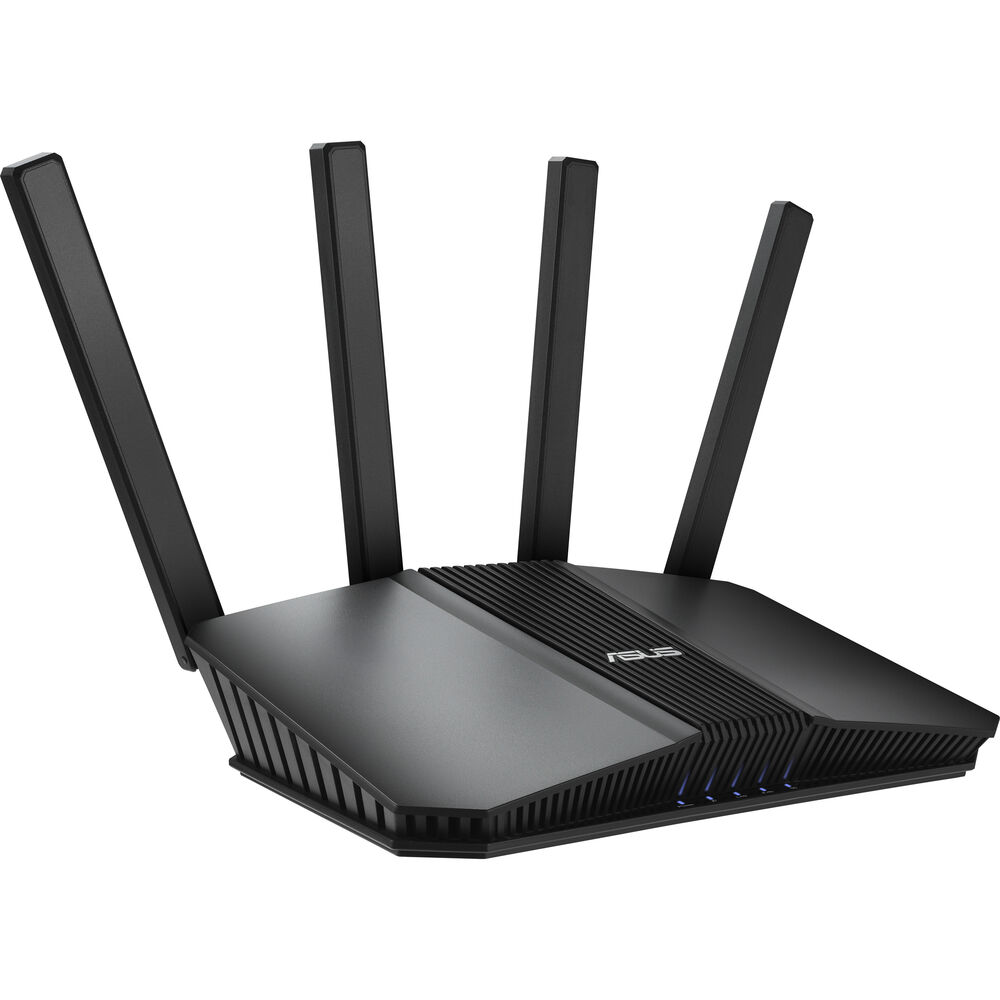
4. ASUS RT-BE58U — Best for VPN and Families
Specs: Dual-band Wi-Fi 7 BE3600 — 2,882 Mbps on 5 GHz, 688 Mbps on 2.4 GHz. Ports: 1 × 2.5 Gbps WAN/LAN, plus gigabit LAN ports, 1 × USB 3.2. Features: MLO, 4K-QAM, AiMesh, AiProtection Pro, VPN client and server, dual-WAN with USB 4G/5G failover.
The RT-BE58U has no 6 GHz band, but keeps what matters for a family or home office: free security, a full VPN suite, dual-WAN, and AiMesh. Parental controls, scheduling, and site blocking are free for the life of the router, and the VPN lets you route specific devices through a tunnel while the rest stays direct. The trade-off is range: testing cited in November 2026 roundups found speeds fall faster past 60 feet than on the tri-band models, so place it centrally.
Pros: Strong value at around $135 in November 2026 research; free AiProtection Pro and parental controls; full VPN with per-device routing; dual-WAN and USB failover.
Cons: No 6 GHz band; only one 2.5 Gbps port; range drops faster at distance than the tri-band picks.
Best for: Families who want free parental controls and security, home-office users who need a router-level VPN, and small to mid-size homes on a 1 Gbps plan.
Check price on Amazon: ASUS RT-BE58U
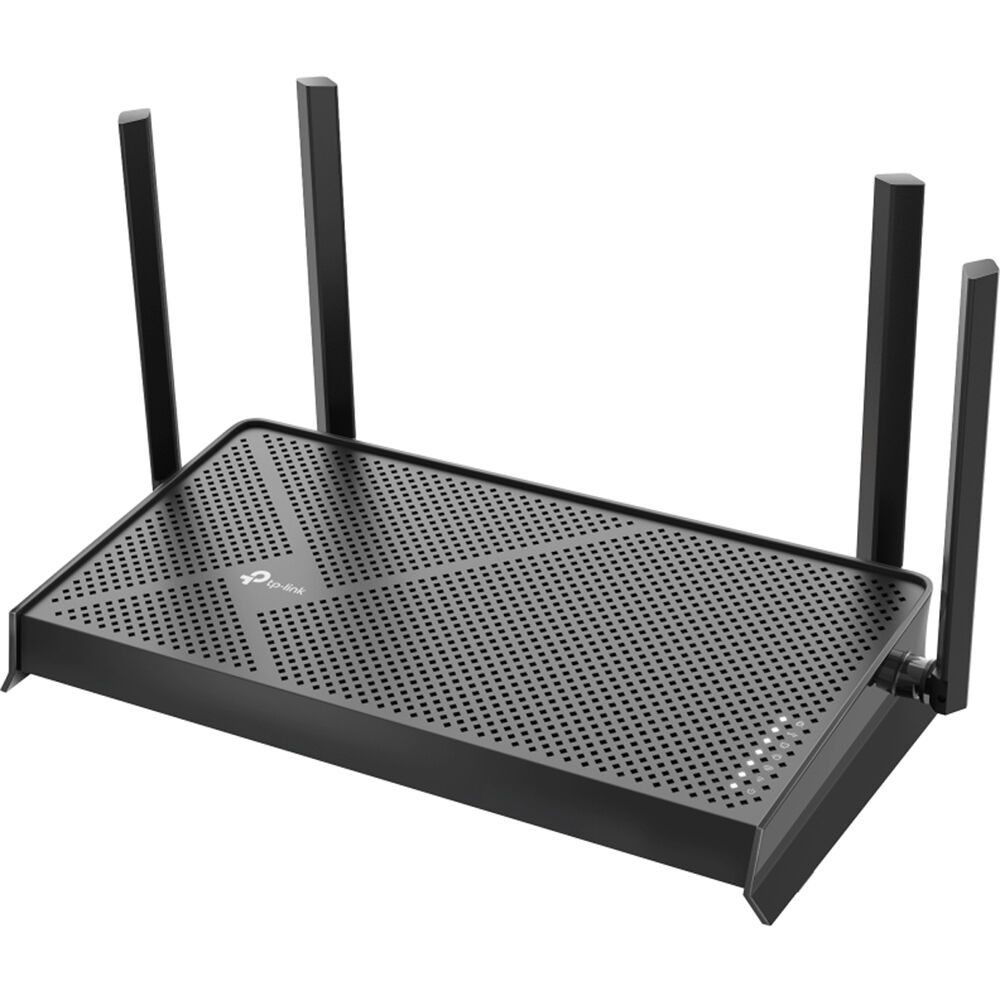
5. TP-Link Archer BE230 — Best Budget Wi-Fi 7 Router
Specs: Dual-band Wi-Fi 7 BE3600 — 2,882 Mbps on 5 GHz, 688 Mbps on 2.4 GHz. Ports: 1 × 2.5 Gbps WAN, 1 × 2.5 Gbps LAN, 3 × 1 Gbps LAN, 1 × USB 3.0. Coverage: up to 2,000 sq ft, up to 60 devices. Features: MLO, 4K-QAM, EasyMesh, HomeShield, VPN.
The BE230 is the cheapest genuine Wi-Fi 7 router here, seen at $79.98–$98 on Amazon US in November 2026 research, against a $119.99 list price. It gives you MLO and a 2.5 Gbps WAN port, so a gigabit-plus plan is not capped at the router, and a wired desktop or console can use the second 2.5 Gbps port. What you do not get is a 6 GHz band, 320 MHz channels, or more than two multi-gigabit ports — a fair trade at this price, and a better buy than a discounted Wi-Fi 6 router at the same price.
Pros: Lowest price here, often under $100; two 2.5 Gbps ports; MLO and 4K-QAM; EasyMesh and VPN tools.
Cons: No 6 GHz band or 320 MHz channels; only two 2.5 Gbps ports; rated for up to 60 devices.
Best for: Budget buyers, renters, small flats, and anyone replacing an ISP router or old Wi-Fi 5 router on a 1 Gbps plan.
Check price on Amazon: TP-Link Archer BE230
What to Avoid
Do not buy on the combined speed number alone. A BE9700 router is not twice as fast as a BE3600 router for one device. Check bands, ports, and coverage instead.
Do not pay for 10 Gbps you cannot use. It helps only if your plan is faster than 2.5 Gbps or you move large files between wired devices. On a 500 Mbps or 1 Gbps plan, spend the difference on placement or a mesh node.
Do not ignore the 6 GHz trade-off. Dual-band is cheaper for a reason. If you later add Wi-Fi 7 laptops and a console, you will have no clean 6 GHz lane. That is fine for a small home with a large price gap; it is a mistake if you save $30 and replace the router in a year.
Do not forget subscriptions and firmware. The ASUS models here include AiProtection Pro free. TP-Link HomeShield has a free basic tier and a paid Pro tier. Update firmware on day one.
Do not trust a single price screenshot. Prices move weekly, and Amazon listings vary by seller. A model at $189.98 in October can be $249.99 in November. Check the current price, seller, and return policy at checkout.
FAQ
What is the best Wi-Fi 7 router under $300?
For most homes, the TP-Link Archer BE550 — tri-band BE9300, 6 GHz, MLO, and five 2.5 Gbps ports, at around $200 in November 2026 research. For multi-gigabit fiber, the TP-Link Archer BE600 or ASUS RT-BE92U fits better, because both add a 10 Gbps port.
Is a Wi-Fi 7 router under $300 worth it in 2026?
Yes, if you have Wi-Fi 7 devices or a plan faster than 1 Gbps. A tri-band Wi-Fi 7 router with 2.5 Gbps ports now costs around $200. With no Wi-Fi 7 devices and a 500 Mbps plan, a good Wi-Fi 6 router is still enough, but the price gap is small enough that Wi-Fi 7 is the better long-term buy for most homes.
Do I need tri-band, or is dual-band enough?
Tri-band is better with Wi-Fi 7 phones, laptops, or consoles. Dual-band is enough for a small home, a 1 Gbps plan, and mainly wired use. The TP-Link Archer BE230 and ASUS RT-BE58U are honest Wi-Fi 7 routers — they just have no 6 GHz radio.
What is the cheapest good Wi-Fi 7 router under $300?
The TP-Link Archer BE230, seen at $79.98–$98 on Amazon US in November 2026 research. It is a dual-band BE3600 router with MLO and two 2.5 Gbps ports, and the lowest-cost way to get real Wi-Fi 7 with a multi-gigabit WAN port.
Can a Wi-Fi 7 router under $300 cover a large home?
A single router here is rated for up to 2,000–2,600 sq ft in ideal conditions; real homes with thick walls will get less. For a large home, pick a router with EasyMesh or AiMesh so you can add a node later, or buy a mesh system instead.
Verdict
Buy the TP-Link Archer BE550 for most homes: tri-band Wi-Fi 7, a real 6 GHz band, and five 2.5 Gbps ports at around $200. Buy the TP-Link Archer BE600 if fiber is faster than 2.5 Gbps or the home is larger. Buy the ASUS RT-BE92U for the same hardware class with AsusWRT, free security, and Merlin support. Buy the ASUS RT-BE58U if VPN and family controls matter more than 6 GHz. Buy the TP-Link Archer BE230 for the cheapest real Wi-Fi 7 upgrade on dual-band.
Check the current price on Amazon before you buy, confirm the seller and return policy, and update firmware after setup. The right ports and band layout matter more than a short-term discount.
Prices were checked against Amazon US listings and secondary price trackers in November 2026. Prices and availability change frequently. The price on Amazon at the time of purchase applies.
As an Amazon Associate, we earn from qualifying purchases.
Suggested Internal Links for gizmopc.com
- Best Wi-Fi 6 Router for Most Homes — from the FAQ on whether Wi-Fi 7 is worth it, for readers on a slower plan.
- Wi-Fi 7 vs. Wi-Fi 6: Which Should You Buy? — from “How to Choose,” for readers who want the full standard comparison.
- Best Mesh Wi-Fi System for Large Homes — from the coverage section, for readers whose home is too large for a single router.
Note for the editor: verify these three slugs exist on gizmopc.com before publishing, and update them to the live URLs if the slugs differ.
More from Amazon
Programs that pair well with the guide above. Offers and eligibility are set by Amazon and may change.
Free shipping on eligible items, Prime Video and more. Eligible new members can start with a free trial.
Start a Prime free trialAd-free music streaming. Eligible new subscribers can start with a free trial.
Try Music Unlimited freeA Prime membership for ages 18-24 with a trial period. Eligibility is set by Amazon.
See Prime for Young AdultsAudiobooks and podcasts to listen to on the go. Eligible new members can start with a free trial.
Try Audible freeAs an Amazon Associate we earn from qualifying purchases.
