
For most gaming PCs in 2026, the best DDR5 RAM is a 32GB (2x16GB) DDR5-6000 CL30 kit with both AMD EXPO and Intel XMP 3.0 profiles. On Ryzen 7000 and 9000 this speed pairs with a 3000 MHz Infinity Fabric clock, which is the highest setting most chips run stably, so paying for faster kits rarely helps. G.Skill Trident Z5 Neo, Corsair Vengeance and Kingston Fury Beast are the usual choices.
Our top picks


As an Amazon Associate we earn from qualifying purchases at no extra cost to you.
Quick comparison
| Pick | Best for | Key specs | Price range |
|---|---|---|---|
| G.Skill Trident Z5 Neo RGB | Best overall for AM5 | 6000 CL30-38-38-96, 1.35V, EXPO and XMP 3.0 | Upper-mid |
| G.Skill Trident Z5 NeoX RGB | Best tuned AM5 kit | 6000 CL30-38-38-32, EXPO | Upper-mid |
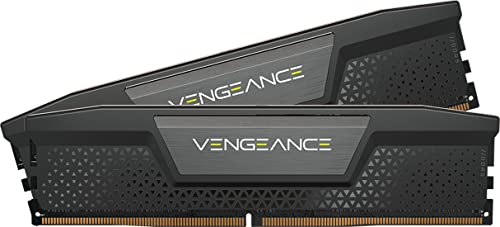
| Corsair Vengeance DDR5 | Best dual-profile, low profile | 6000 CL30, EXPO and XMP 3.0, fits large air coolers | Mid-range |
| Kingston Fury Beast DDR5 | Best low-profile | 6000 CL30, slim heat spreader | Mid-range |
| Patriot Viper Venom RGB | Best budget | 6000 CL30, SK Hynix ICs | Budget to mid-range |
| Corsair Dominator Titanium 64GB | Best high capacity | 6000 CL30-36-36-76, 1.40V, EXPO and XMP 3.0 | Premium |
Best overall: G.Skill Trident Z5 Neo RGB 32GB 6000 CL30
TechRepublic and Newegg’s buying guides both highlight this kit for AM5 gaming. It runs at 1.35V with EXPO and XMP profiles. The trade-off is height: the RGB heat spreader can clash with large tower coolers, so check clearance.
Best dual-profile: Corsair Vengeance 6000 CL30
Corsair’s Vengeance has a low profile that suits large coolers such as the Noctua NH-D15 and ships with both EXPO and XMP 3.0. It is the safer choice if you might move between AMD and Intel boards.
Best low-profile: Kingston Fury Beast 6000 CL30
Its slim heat spreader avoids cooler clashes. The trade-off is plainer looks and no RGB.
Best budget: Patriot Viper Venom RGB 6000 CL30
Newegg lists it as the budget pick, using SK Hynix ICs. Budget does not mean cheap: DDR5 prices are elevated in 2026, so CL36 kits such as the Crucial Pro OC or G.Skill Trident Z5 RGB are a workable cheaper alternative.
Best for capacity: Corsair Dominator Titanium 64GB
For editing, VMs or large simulations, 64GB at CL30 and 6000 is demanding on the memory controller. The trade-off is price, and kits above 64GB may need slower speeds to stay stable.
Worked example: latency in nanoseconds
| Kit | CAS latency | True latency (ns) |
|---|---|---|
| DDR5-6000 CL30 | 30 | 10.0 |
| DDR5-6000 CL36 | 36 | 12.0 |
| DDR5-6400 CL32 | 32 | 10.0 |
| DDR5-5600 CL40 | 40 | 14.3 |
True latency equals CAS divided by half the transfer rate, times 1000. DDR5-6000 CL30 works out to 10.0 ns, the same as 6400 CL32. That is why 6000 CL30 and 6400 CL32 land close in performance, and why dropping to CL36 costs about 2 ns.
How to choose
Pick 32GB for gaming
32GB (2x16GB) is the sweet spot. 16GB is tight for new games, and 64GB only helps heavy multitasking or creative work.
Use two sticks
Two DIMMs run faster and more stably than four, which often force a lower speed.
Match the platform
For AM5, 6000 CL30 with EXPO. For Intel LGA 1851, a 6400 CL32 kit gives some headroom.
Enable the profile
Advertised speeds are overclock profiles. Turn on EXPO or XMP in the BIOS and update the firmware, because the CPU, board and kit all affect stability.
Common DDR5 mistakes to avoid
The first mistake is skipping the BIOS profile. A new kit runs at a safe default speed, often 4800 MT/s, until you enable EXPO or XMP, so a DDR5-6000 kit that was never switched on performs like a much slower one. The second is buying four sticks for capacity: four DIMMs put more load on the memory controller, and many boards then need a lower speed to stay stable. A pair of 32GB sticks is a better route to 64GB than four 16GB sticks.
The third mistake is ignoring height. Heat spreaders on RGB kits can reach over 40 mm, which collides with the top of large dual-tower air coolers on the first memory slot. Check the cooler maker’s memory clearance figure before ordering. The fourth is paying for speed the platform cannot use: on AM5, kits above 6000 to 6400 MT/s usually run with the memory and fabric clocks decoupled, which can erase the benefit.
Upgrade path and long-term value
AM5 is designed to last several CPU generations, so a good 32GB kit bought now should carry into your next processor. If you expect to need 64GB later, buy a 2x32GB kit rather than adding a second 2x16GB kit; mixing kits is the most common cause of failed memory training. Keep the kit model number, because matching a kit years later is harder than buying the right size once.
Frequently Asked Questions
Is DDR5-6000 CL30 the best speed?
For Ryzen 7000 and 9000 it is the most common sweet spot. Faster kits cost more and rarely improve gaming.
Is 32GB of DDR5 enough?
Yes, for gaming and general use. Go to 64GB only for heavy editing, virtual machines or large projects.
EXPO or XMP?
EXPO is AMD’s profile and XMP is Intel’s. Dual-profile kits work on both, but use the one your platform supports.
Is DDR5 worth it over DDR4?
New platforms require DDR5. If you are on DDR4, upgrade the whole platform rather than swapping RAM.
Why is DDR5 so expensive in 2026?
Market reports show elevated prices, and listings vary widely. Compare current prices before buying and consider CL36 if CL30 costs too much.





