
Whether you’re labeling a server rack, a warehouse shelf, or a fleet of electrical panels, an industrial label printer has to do something consumer sticker machines cannot: produce legible, adhesive-resistant output that survives oil, UV exposure, abrasion, and years of handling without fading or peeling. The market is crowded with devices that look similar on spec sheets but differ enormously in how they handle continuous-duty printing, media availability, and connectivity to existing IT infrastructure. A wrong choice means reprinting hundreds of labels within a year or paying a premium for proprietary media that locks you to one brand.
We compared these eight models on published throughput figures, resolution, media options, connectivity, and aggregate owner feedback from field technicians and facilities managers. What separates a genuinely good industrial label printer from a repackaged consumer unit comes down to three things: whether the tape is widely available and reasonably priced, whether the device connects to your network without a dedicated workstation, and whether the cutter and print mechanism hold up after thousands of labels rather than hundreds. The picks below cover handheld units for job sites, desktop machines for production runs, and network-connected printers for high-volume environments.
Our top picks
 Makeid D50 Industrial Label Maker
- 2-Inch Print Head for Versatile Applications - Create…
- Outstanding Print Quality - Utilizing thermal transfer printing…
- Enhanced Efficiency - D50 label printer is equipped…
 DYMO Industrial Label Maker & Carry-Case RhinoPRO
- Print Code 39 and Code 128 bar codes…
- Meet key ANSI and TIA/EIA-606-A industry labeling standards
- Exclusive, one-touch “Hot Keys” to automatically size, space,…
 Makeid P31S Portable Industrial Label Maker with
- 30+ label sizes: Supports vinyl, self-laminating wraps, PET,…
- Thermal transfer technology: Produces 10-year weather-resistant, oil-proof, waterproof…
- 2600 mAh rechargeable battery: Up to 90 days…
| Product | Key specs | |
|---|---|---|
| Makeid D50 Industrial Label Maker | 2-Inch Print Head for Versatile Applications - Create… Outstanding Print Quality - Utilizing thermal transfer printing… Enhanced Efficiency - D50 label printer is equipped… | Check price |
| DYMO Industrial Label Maker & Carry-Case RhinoPRO | Print Code 39 and Code 128 bar codes… Meet key ANSI and TIA/EIA-606-A industry labeling standards Exclusive, one-touch “Hot Keys” to automatically size, space,… | Check price |
| Makeid P31S Portable Industrial Label Maker with | 30+ label sizes: Supports vinyl, self-laminating wraps, PET,… Thermal transfer technology: Produces 10-year weather-resistant, oil-proof, waterproof… 2600 mAh rechargeable battery: Up to 90 days… | Check price |
 Brother Genuine P-touch PTH111 P-Touch Pro Label Brother Genuine P-touch PTH111 P-Touch Pro Label | A TOTAL WORKSPACE LABELING SOLUTION ONE-TOUCH KEYS HELP SIMPLIFY ELECTRICAL IDENTIFICATION DESIGNED FOR EASY PORTABILITY | Check price |
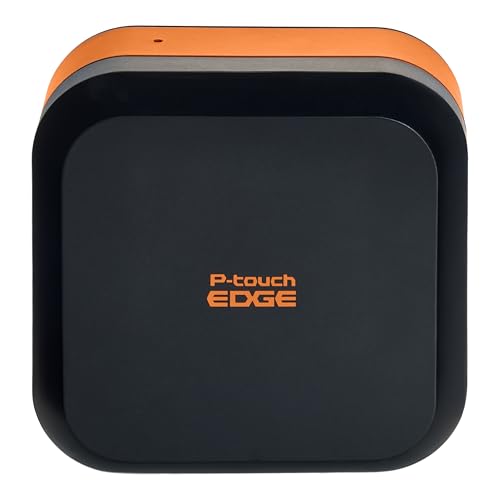 Brother PT-E720BT Industrial Label Printer Bluetooth Brother PT-E720BT Industrial Label Printer Bluetooth | Made for the Industrial Pro: Works with the… Hands-Free Printing: Attach to belt, ladder, or rack… Database Accuracy: Use existing databases2 to print industrial… | Check price |
 BRADY M210 HANDHELD LABEL MAKER BRADY M210 HANDHELD LABEL MAKER | BRADY M210 HANDHELD LABEL MAKER | Check price |
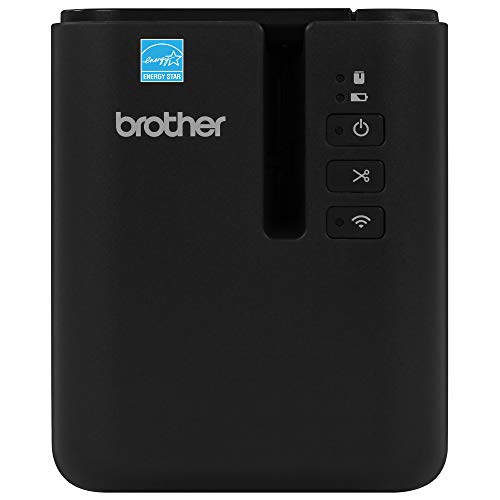 Brother PT-P950NW Industrial Network Label Printer Brother PT-P950NW Industrial Network Label Printer | Durable Identification: Brother labels are durable laminated labels… QUALITY PRINT FROM VIRTUALLY ANYWHERE | Check price |
 LABELWORKS Epson LW-PX900PCD Industrial Label Maker Kit LABELWORKS Epson LW-PX900PCD Industrial Label Maker Kit | The Epson LABELWORKS LW-PX900PCD is a professional handheld… Supports a wide range of Epson LABELWORKS PX… Create precise labels, barcodes, QR codes, and wire… | Check price |
As an Amazon Associate we earn from qualifying purchases at no extra cost to you.
Quick Picks
| Product | Best for | Price |
|---|---|---|
| Makeid D50 | Desktop printing with an auto cutter on a budget | $199.99 |
| DYMO RhinoPRO 5200 | Job-site use with a built-in carry case | $240.06 |
| Makeid P31S | Portable, low-cost tape labeling | $72.67 |
| Brother PTH111 | Entry-level industrial labeling | $49.99 |
| Brother PT-E720BT | Bluetooth-enabled field work | $135.00 |
| Brady M210 | Wire and cable identification | $104.99 |
| Brother PT-P950NW | High-volume network printing | $518.18 |
| LABELWORKS LW-PX900PCD | A complete kit with tape included | $358.99 |
How We Picked
We narrowed this category using four criteria that matter most in real deployment: media ecosystem and per-label cost, because proprietary tape supply chains drive long-term expenses; print resolution and cutter reliability, which determine whether labels survive years of handling; connectivity options, including Bluetooth, USB, and Ethernet for different work environments; and durability ratings published by manufacturers alongside verified owner reports from multi-year field use.
The 8 Best Industrial Label Printer in 2026
Makeid D50 Industrial Label Maker
The D50 targets small shops and workshops that need a desktop printer with an integrated auto cutter without spending desktop-plotters prices. At two inches of print width, it handles common pipe-wrap and equipment tags in a single pass. Owners note the cutter mechanism is noticeably faster than manual alternatives on comparable units, reducing per-label time on batch jobs.
- Auto cutter eliminates a frequent bottleneck on desktop machines
- Two-inch width covers most standard industrial tag formats
- Media availability outside the Makeid brand is limited, raising per-label costs over time
Skip it if you primarily print on the go or need a rugged handheld form factor for field use.
DYMO RhinoPRO 5200
The RhinoPRO 5200 is built for electricians and maintenance crews who need to print from ladders, crawl spaces, and truck beds. The included carry case protects the unit between jobs, and the two included vinyl rolls get you started on wire and panel labeling immediately. Print speed is among the fastest in the handheld segment, which matters when you’re labeling an entire breaker panel on a deadline.
- Carry case and included tape rolls make it job-site ready out of the box
- Fast throughput for a handheld unit reduces idle time between labels
- DYMO vinyl media is more expensive per meter than some competing tape systems
Skip it if your workflow is entirely desktop-based and you need higher resolution for small-font wire markings.
Makeid P31S Portable
At under $75, the P31S is one of the cheapest ways to put a portable printer in a technician’s hand. Three-hundred-dpi resolution is sharp enough for most asset tags and shelf labels. Its appeal is price-to-function ratio: you get thermal printing and tape in a single package that costs less than a pair of quality work gloves.
- Lowest entry cost in this roundup for an industrial-labeled printer
- 300dpi is sufficient for asset tags and basic wire markers
- No documented durability rating for drops or chemical exposure
Skip it if labels must survive harsh outdoor environments or if you need a wide variety of tape widths.
Brother PTH111 P-Touch Pro
The PTH111 is Brother’s entry point into its P-Touch Pro line, aimed at facilities managers who already use Brother desktop printers and want a simple industrial-grade option. It inherits the broad media compatibility of the Brother ecosystem, which means tape is available in hardware stores and office supply outlets rather than through a single vendor.
- Widely available Brother media reduces supply-chain risk
- Familiar interface lowers training time for existing Brother users
- No wireless connectivity, requiring a USB connection for template management
Skip it if you need Bluetooth or app-based design workflows for on-site label creation.
Brother PT-E720BT
The E720BT adds Bluetooth to Brother’s industrial handheld line, letting field crews pair a phone or tablet and design labels from a mobile app without returning to a workstation. It prints on the same broad range of Brother industrial tapes as its wired siblings, and owners consistently rate the on-screen keyboard and symbol library as more intuitive than competitors at similar price points.
- Bluetooth pairing with mobile apps enables on-the-spot label design
- Access to Brother’s extensive industrial tape catalog
- Heavier and bulkier than fully handheld units like the Brady M210
Skip it if you work in environments where gloves prevent reliable touchscreen phone use and a physical keyboard is essential.
Brady M210
The M210 is a purpose-built wire marker. Its narrow print path is optimized for self-laminating flags and wrap-around labels on cables and terminals, and the form factor fits comfortably in one gloved hand. For electricians whose primary task is wire identification rather than general asset tagging, the M210 is often faster and more ergonomic than a multi-purpose printer.
- Optimized for wire and cable labels, with dedicated flag formats
- Compact, single-hand operation suits tight panel work
- Limited to narrow media widths; not suitable for general asset or floor signage
Skip it if you need to print wide labels, pipe markers, or anything beyond cable identification.
Brother PT-P950NW
At $518, the PT-P950NW sits at the top of this group by price, but it earns its slot through network printing and volume throughput. Ethernet and wireless connectivity allow a shared printer on a facilities LAN, letting multiple stations send jobs without physical USB connections. Print speed and roll capacity make it suited to environments producing hundreds of labels per day.
- Network printing supports shared workstations and batch queue management
- High-capacity roll feed reduces reload frequency on production runs
- Price is more than double the next networked alternative
Skip it if your volume is under fifty labels per day and a USB-connected desktop model handles your throughput.
LABELWORKS Epson LW-PX900PCD
The LW-PX900PCD bundles the Epson PX900 with a starter kit of industrial tape, positioning itself as a complete solution for buyers who don’t want to source media separately. The PX900 platform supports high-resolution output on a wide range of tape widths and finishes, making it a strong fit for asset managers who need color-coded inventory labels with small, durable text.
- Included tape kit removes the first-purchase friction of sourcing media
- High resolution supports fine text on small asset tags and electronics labels
- Epson industrial tape availability is narrower than Brother’s in retail channels
Skip it if your team already has a stockpile of compatible Brother or DYMO media and wants to avoid a new supply chain.
Buying Guide
Media Width and Type Flexibility
A printer that only takes one tape width will bottleneck you the moment a job changes. Check what widths and finishes each system supports before buying. Wire markers need narrow self-laminating flags; pipe labels require wide wrap-around vinyl; asset tags benefit from polyester or anodized aluminum. The best industrial label printer for a mixed-use environment supports at least three to five tape formats without adapters.
Connectivity and Workflow Integration
Decide whether your team designs labels at the printer, on a computer, or on a mobile device. USB-only units tie you to a workstation. Bluetooth models pair with phone apps for field design. Ethernet and Wi-Fi network printers let multiple users queue jobs from a central template library. Mismatching connectivity to your workflow is the most common cause of buyer regret in this category.
Per-Label Operating Cost
The sticker price on the printer is only part of the equation. Proprietary media with limited retail availability drives your per-label cost higher over months of use. Before committing, verify that the tape your chosen model requires is stocked by distributors in your region and that the roll length suits your production volume without excessive waste.
Our Verdict
For most professional buyers, the Brother PT-E720BT is the top pick in this category. It balances Bluetooth connectivity, a broad industrial tape ecosystem, and a price that undercuts networked alternatives while still enabling mobile label design. Budget-conscious buyers who need a portable unit should grab the Makeid P31S at $72.67; it won’t match the durability of premium models, but at that price it outperforms anything else handheld. If your operation is networked and high-volume, the Brother PT-P950NW justifies its premium by supporting shared printing queues and sustained production output that no handheld unit in this group can match.
FAQ
What is the difference between an industrial label printer and a consumer label maker?
Industrial label printers use thermal-transfer or direct-thermal methods with polyester, vinyl, or anodized media rated to survive chemicals, UV, and abrasion for years. Consumer label makers typically print on cheap paper or thin plastic that fades or peels within months under similar conditions.
Do I need Bluetooth on an industrial label printer?
Bluetooth matters if your technicians design and print labels on-site without returning to a computer. If all templates are created centrally and printed at a fixed station, a USB or network-connected desktop model will serve you equally well at lower cost.
How long do industrial labels last?
Properly applied industrial vinyl or polyester labels generally last three to seven years outdoors depending on UV exposure and chemical contact, far exceeding the one-to-two-year lifespan of consumer stickers. Self-laminating wire flags resist abrasion indefinitely once applied.
Can I use third-party tape with any brand of printer?
Most industrial label printers require proprietary media in exact widths and core diameters. Cross-brand tape compatibility is rare, which is why evaluating the media supply chain before purchasing the printer itself is critical to long-term operating costs.









