
Key takeaways
- Best Overall: Elgato Facecam 4K, for uncompressed 4K60 and full manual control
- Best Premium Image: Razer Kiyo Pro Ultra, with the largest sensor and an f/1.7 lens
- Best for Movement: Insta360 Link 2 Pro, a gimbal camera that physically tracks you
- Best for Streaming Plus Work Calls: Logitech MX Brio, with a wide 90° view and auto-framing
- Best Value 4K: OBSBOT Meet 2, with a 1/2-inch sensor and PDAF in a tiny body
- Newest 4K60 Option: Razer Kiyo V2 Pro, with 4K60 plus 1440p60 and AI framing
- Best Budget: EMEET S600, which gives you 4K30 and phase-detect autofocus for little money
Looking for the best webcam for streaming in 2026? Here’s the short answer. The Elgato Facecam 4K is our top pick for most Twitch and YouTube streamers. It records uncompressed 4K at 60 frames per second on a Sony STARVIS 2 sensor, and its fixed-focus prime lens can’t hunt for focus in the middle of a stream. The runner-up is the Razer Kiyo Pro Ultra. Its 1/1.2-inch sensor is the largest in this list, so it’s the one to buy if your room is dim or you want natural background blur without software tricks.
This guide covers seven main picks and four extras, from budget 4K cameras to tracking webcams that follow you around the room. Every spec comes from the manufacturer’s sheet or established spec listings. This page contains affiliate links, and we may earn a commission when you buy through them, at no extra cost to you.
Top Picks at a Glance
- Best Overall: Elgato Facecam 4K, for uncompressed 4K60 and full manual control
- Best Premium Image: Razer Kiyo Pro Ultra, with the largest sensor and an f/1.7 lens
- Best for Movement: Insta360 Link 2 Pro, a gimbal camera that physically tracks you
- Best for Streaming Plus Work Calls: Logitech MX Brio, with a wide 90° view and auto-framing
- Best Value 4K: OBSBOT Meet 2, with a 1/2-inch sensor and PDAF in a tiny body
- Newest 4K60 Option: Razer Kiyo V2 Pro, with 4K60 plus 1440p60 and AI framing
- Best Budget: EMEET S600, which gives you 4K30 and phase-detect autofocus for little money
Best Streaming Webcams Compared
| Webcam | Best For | Max Video | Sensor | Focus | Watch For | Price Tier |
|---|---|---|---|---|---|---|
| Elgato Facecam 4K | Most streamers | 4K60 (HDR at 30fps) | 1/1.8″ STARVIS 2 | Fixed | No mic; needs USB 3.0 | Mid-range |
| Razer Kiyo Pro Ultra | Low light, premium look | 4K30, 1080p60 | 1/1.2″ STARVIS 2 | Auto | Large and heavy | Premium |
| Insta360 Link 2 Pro | Moving creators | 4K30, 1080p60 | 1/1.3″ | PDAF | Bokeh needs a capable GPU | Upper-mid |
| Logitech MX Brio | Streams plus calls | 4K30, 1080p60 | 8.5MP STARVIS | Auto | 4K limited to 30fps | Upper-mid |
| OBSBOT Meet 2 | Value 4K | 4K30, 1080p60 | 1/2″ 48MP | PDAF | USB 2.0 interface | Budget to mid |
| Razer Kiyo V2 Pro | 4K60 with framing | 4K60, 1440p60 | 8.3MP STARVIS 2 | Auto | Brand-new model | Upper-mid |
| EMEET S600 | Tight budgets | 4K30, 1080p60 | 1/2.55″ Sony | PDAF | No auto-framing | Budget |
1. Elgato Facecam 4K: Best Overall Webcam for Streaming

Elgato Facecam 4K, 4K60 Studio Webcam, DSLR-Like Control


As an Amazon Associate we earn from qualifying purchases. Product prices and availability are accurate as of the date/time indicated.
- Video: 2160p60, 1440p60, 1080p60; HDR up to 2160p30
- Sensor: Sony STARVIS 2, 1/1.8-inch
- Lens: 7-element prime, f/4.0, 90° field of view, fixed focus
- Connection: USB-C; USB 3.0 required for 4K60 and HDR
- Extras: 49mm filter thread, onboard settings memory, no microphone
Best for: Seated streamers who want a sharp, consistent image and control over every setting. Skip if: You need a built-in mic or only have USB 2.0 ports.
The Facecam 4K takes the approach Elgato has refined over several generations. It gives you a clean video feed, manual controls that feel like a real camera, and no gimmicks. The headline spec is uncompressed 4K at 60fps over USB 3.0, which is unusual at this price. Most 4K webcams top out at 30fps at full resolution. For a streamer, that 60fps matters even when you broadcast at 1080p. You can downscale a 4K60 source in OBS, crop in for a tighter shot, and keep motion smooth when you lean toward the camera or gesture.
The fixed-focus lens is the decision that divides opinion. Elgato tunes it for 30 to 120cm at 4K, which covers the normal distance between a desk chair and a monitor. Within that range, focus never hunts. That’s a common complaint with contrast-detect autofocus when you hold a product up to the lens. The trade-off is that close-up product shots under about 30cm will be soft. Unboxing or hardware-review streamers may prefer the Insta360 or Razer picks below.
Compared with the Kiyo Pro Ultra, the Facecam 4K has a smaller sensor, so it needs decent lighting to look its best. Pair it with a key light and it’ll compete with cameras that cost twice as much. The 49mm filter thread is a thoughtful touch for longevity. You can add an ND or diffusion filter later without replacing the camera.
Pros
- Uncompressed 4K60 is rare in this price tier
- Focus never hunts mid-stream
- Camera Hub software gives DSLR-style exposure control
- Filter thread adds creative options
Cons
- No built-in microphone
- HDR only works at 30fps
- Soft image when objects are very close to the lens
2. Razer Kiyo Pro Ultra: Best Premium Image Quality

Razer Kiyo Pro Ultra 4K Webcam, Large Sensor, Built-in Mic and Shutter


As an Amazon Associate we earn from qualifying purchases. Product prices and availability are accurate as of the date/time indicated.
- Video: 4K30, 1440p30, 1080p60, 720p60
- Sensor: Sony STARVIS 2, 1/1.2-inch, 2.9μm pixels
- Lens: f/1.7, 72° to 82° diagonal field of view depending on resolution
- Focus: Autofocus with face tracking; 4x digital zoom
- Extras: HDR, built-in mic, privacy shutter, USB 3.0
Best for: Streamers in dim rooms or anyone who wants a cinematic look with real depth of field. Skip if: You want 4K at 60fps or a compact camera.
Razer markets the Kiyo Pro Ultra as having the largest sensor ever put in a webcam. At 1/1.2 inches, it’s noticeably bigger than everything else here, including the Link 2 Pro’s 1/1.3-inch chip. A bigger sensor collects more light per pixel. On paper, this camera should hold onto detail and colour in lighting that would make smaller sensors look muddy. The bright f/1.7 aperture adds optical background blur, so your room falls softly out of focus without AI masking artefacts around your hair and headset.
The trade-off is frame rate. Full 4K is capped at 30fps, and 1080p60 is the mode most streamers will actually use. That’s still a perfectly good broadcast format, because Twitch and most platforms deliver 1080p or lower to viewers. If you mainly stream at 1080p60, the Kiyo Pro Ultra’s image quality at that resolution is the reason to buy it. If you want to record 4K60 for edited YouTube videos, the Facecam 4K or Kiyo V2 Pro make more sense.
It’s a big camera, roughly 76mm across and heavier than its rivals, so check that your monitor bezel can hold the clamp securely. It’s also the oldest design in this list. Even so, its sensor advantage hasn’t been overtaken by a mainstream webcam, so it remains a sound long-term buy.
Pros
- Largest sensor in the category
- Bright f/1.7 lens for natural background blur
- Strong low-light potential
- Works with OBS and XSplit
Cons
- 4K tops out at 30fps
- Bulky and heavy on thin monitors
- Highest price among the main picks
3. Insta360 Link 2 Pro: Best for Creators Who Move

Insta360 Link 2 Pro – 4K PTZ Webcam for PC/Mac, 1/1.3” Sensor, Low-Light, AI Tracking, HDR, Directional Noise-Canceling Mics, Supports Stream Deck, Zoom, Teams, Twitch for Streaming or Meetings






As an Amazon Associate we earn from qualifying purchases. Product prices and availability are accurate as of the date/time indicated.
- Video: 4K30, 1080p60, 720p60
- Sensor: 1/1.3-inch with dual native ISO (100 to 3200)
- Lens: 24mm equivalent, f/1.9, 83.9° diagonal field of view
- Focus: Phase-detection autofocus from 12cm
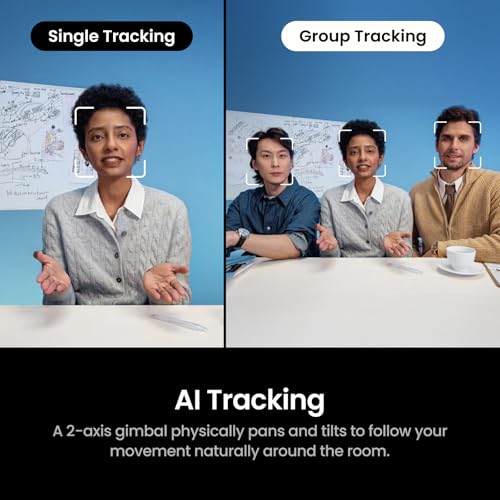
- Extras: 2-axis gimbal with AI tracking, gesture control, beamforming mics
Best for: Fitness, cooking, music or whiteboard streamers who don’t stay in one spot. Skip if: You sit still and want the simplest setup.
The Link 2 Pro arrived in early 2026 and quickly became the reference point for tracking webcams. Its 2-axis gimbal physically pans and tilts to keep you in frame. Digital cropping can’t match that, because it never throws away resolution to follow you. If you stand up to show a guitar chord or walk to a whiteboard, the camera turns with you while still shooting at full quality.
The imaging hardware is a big step up from the original Link 2. Insta360 rates the new 1/1.3-inch sensor at more than twice the light-gathering area. Paired with phase-detection autofocus, it should snap to focus when you hold an object close, which suits product demos and unboxings. Dual native ISO is another low-light aid. In practice that means less noise in evening streams before you add any lighting.
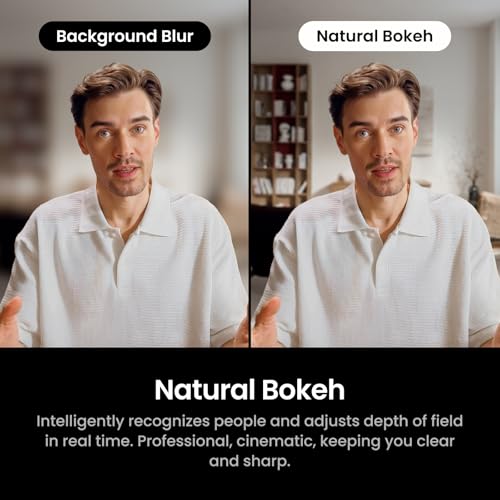
A few caveats apply. The Natural Bokeh feature needs at least an NVIDIA GTX 1080 or RTX 2060 class GPU on Windows, and AMD graphics are not supported for it. The gimbal also adds some height and moving parts. If you never leave your chair, the Link 2C Pro gives you the same imaging without the gimbal for less money. The Link 2 Pro is the right choice when movement is part of your content.
Pros
- Physical tracking keeps full resolution
- Large 1/1.3-inch sensor with PDAF
- Gesture control works without touching software
- Flexible directional and omnidirectional mic modes
Cons
- 4K limited to 30fps
- Bokeh feature excludes AMD GPUs
- Overkill for seated streamers
4. Logitech MX Brio: Best for Streaming and Work Calls

Logitech MX Brio Ultra HD 4K Webcam Collaboration and Streaming - Graphite


As an Amazon Associate we earn from qualifying purchases. Product prices and availability are accurate as of the date/time indicated.
- Video: 4K30, 1080p60, 720p60
- Sensor: 8.5MP Sony STARVIS
- Lens: f/2.0, autofocus, 90°/78°/65° field of view, 4x digital zoom
- Audio: Dual beamforming microphones
- Extras: RightSight auto-framing, Show Mode, privacy shutter, USB-C 3.0
Best for: People whose webcam does double duty for streams by night and meetings by day. Skip if: You want 4K60 or DSLR-style manual controls.
The MX Brio is Logitech’s most advanced webcam, and it’s the safest pick if you split your time between streaming and work. Its 8.5MP STARVIS sensor has much larger pixels than the older Brio 4K. Logitech claims better face visibility in difficult light. Three selectable fields of view (90°, 78° and 65°) let you go wide for a two-person podcast or tight for a solo facecam overlay without moving the camera.
What sets it apart for hybrid use is software polish. It’s certified for the major meeting platforms, auto-framing keeps you centred during calls, and Show Mode lets you tilt the camera down to show something on your desk. Streamers get 1080p60, which is the sweet spot for Twitch. The 4K30 mode is useful for recording or cropping in post.
Compared with the Facecam 4K, the MX Brio trades uncompressed 4K60 and fine manual control for autofocus, built-in microphones and that wider 90° view. For a streamer who already owns a good microphone, the mics are a backup rather than a feature. For someone setting up a first streaming desk, they can save buying a mic on day one.
Pros
- Three fields of view, up to a wide 90°
- Good low-light sensor for the class
- Polished meeting-app compatibility
- Built-in privacy shutter
Cons
- 4K capped at 30fps
- Fewer manual controls than Elgato or Razer
- Pricier than value 4K rivals
5. OBSBOT Meet 2: Best Value 4K Streaming Webcam

OBSBOT Meet 2-4K Webcam for PC with 1/2" Sensor, AI Framing & Autofocus


As an Amazon Associate we earn from qualifying purchases. Product prices and availability are accurate as of the date/time indicated.
- Video: 4K30, 1080p60, 720p60
- Sensor: 1/2-inch CMOS, 48MP effective
- Lens: f/1.8, 79.4° diagonal field of view, 4x digital zoom
- Focus: PDAF from 10cm
- Extras: AI framing, HDR, dual mics, magnetic privacy cover, about 40g body
Best for: New streamers who want real 4K hardware and fast autofocus without paying flagship prices. Skip if: You need uncompressed 4K or physical tracking.
The Meet 2 is tiny, about the size of a matchbox, yet its 1/2-inch sensor is larger than what many big-brand webcams use. A bright f/1.8 aperture and phase-detection autofocus round out a spec sheet that would have been premium only a couple of years ago. For a streamer on a budget, that combination means sharp focus when you hold up a controller or a figure, and better behaviour in average room lighting than typical budget cameras.
AI framing keeps you centred if you lean or shift in your chair, though it’s a digital crop rather than the motorised tracking of the Insta360. If you want motorised tracking from OBSBOT, the Tiny 2 Lite uses the same sensor class on a gimbal. The Meet 2 is the fixed version for people who don’t need one.
The main limitation is the USB 2.0 interface. Video is compressed before it reaches your PC, which is fine for live streaming at 1080p60 but leaves less room for heavy colour grading in post. For most first setups, it’s the easiest 4K camera to recommend at this tier.
Pros
- Large sensor for the price
- Fast PDAF autofocus
- Very small and light
- HDR and AI framing included
Cons
- USB 2.0 means compressed video
- Framing is digital, not motorised
6. Razer Kiyo V2 Pro: Newest 4K60 Pick With AI Framing

Razer Kiyo V2 Pro Webcam for Streaming and Content Creation, 4K 60 FPS





As an Amazon Associate we earn from qualifying purchases. Product prices and availability are accurate as of the date/time indicated.
- Video: 4K60, 1440p60
- Sensor: 8.3MP Sony STARVIS 2, back-illuminated
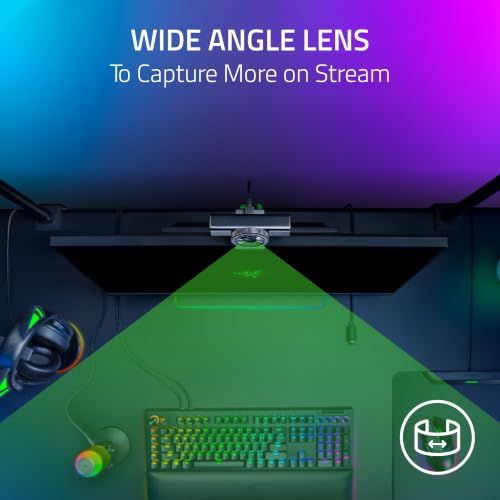
- Lens: f/1.9, 86° field of view
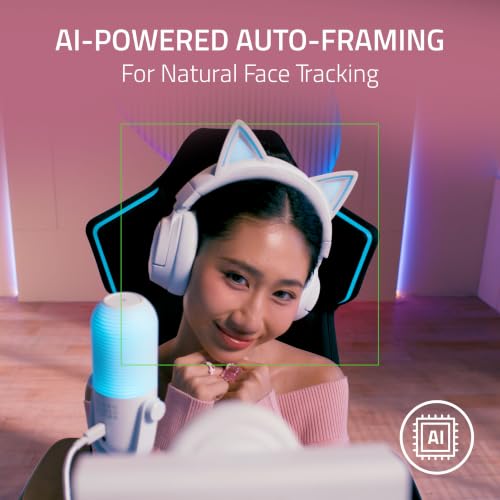
- Features: AI auto-framing, one-click enhancement, UHDR
- Extras: Twist privacy shutter, monitor clamp and tripod-ready mount
Best for: Streamers who want 4K60 like the Facecam 4K plus autofocus-style convenience and auto-framing. Skip if: You’d rather wait for long-term owner feedback on a brand-new model.
Razer launched the Kiyo V2 Pro in late September 2026, so it’s the newest camera in this guide. Its big change from the regular Kiyo V2 is 60fps at both 4K and 1440p. The 1440p60 mode is a smart middle ground. It gives you room to crop for a 1080p stream while keeping file sizes and USB bandwidth more manageable than 4K.
Razer narrowed the field of view to 86° (from 93° on the Kiyo V2) to reduce edge distortion at 4K. That framing suits a single seated streamer. The f/1.9 lens is brighter than the Facecam 4K’s f/4.0, which should help in typical home lighting. Elgato’s fixed focus is the safer bet for consistency, while Razer’s AI framing pans and zooms to keep you centred. Synapse also unlocks ISO and shutter controls for people who like to tweak.
Since it’s so new, treat it as the forward-looking option. On paper, it combines the Facecam 4K’s 4K60 headline with features the Elgato lacks. Pricing sits in the upper-mid tier, above the Facecam 4K and below the Kiyo Pro Ultra.
Pros
- 4K60 and 1440p60 recording
- Bright f/1.9 lens
- AI auto-framing and fine manual controls
- Built-in privacy shutter
Cons
- Sensor size not published in inches
- Too new for long-term reliability data
7. EMEET S600: Best Budget Webcam for Streaming

EMEET S600 4K Webcam for Streaming, Sony 1/2.55'' Sensor, PDAF Autofocus


As an Amazon Associate we earn from qualifying purchases. Product prices and availability are accurate as of the date/time indicated.
- Video: 4K30, 1080p60, 1080p30
- Sensor: Sony 1/2.55-inch
- Lens: 73° field of view at 4K; adjustable 40° to 73° at 1080p
- Focus: Phase-detection autofocus
- Extras: Dual noise-reduction mics, built-in privacy cover
Best for: First-time streamers who want a clear upgrade from a laptop camera for very little money. Skip if: You stream in a dark room or want auto-framing.
The S600 brings two features you’d once only find on far pricier webcams. It shoots 4K at 30fps and uses phase-detection autofocus. For a streamer, the useful mode is 1080p60, which keeps motion smooth on Twitch and YouTube. PDAF means the camera refocuses quickly when you move closer or hold something up, so you avoid the slow, pulsing focus of older budget webcams.
The 73° field of view is on the narrow side, which suits a single person at a desk and hides a messy room. At 1080p you can narrow it further for a tight facecam crop. The sensor is smaller than the OBSBOT Meet 2’s, so expect it to rely more on good lighting. A cheap LED panel helps a lot here.
There’s no AI tracking or framing. At this price, the S600 delivers the basics a beginner needs and leaves money for a microphone, which matters more to viewers than camera resolution.
Pros
- 4K and PDAF at a budget price
- Smooth 1080p60 for live streams
- Built-in privacy cover
Cons
- Smaller sensor needs good lighting
- No auto-framing or tracking
- Narrower view than most rivals
Also Consider
Logitech StreamCam

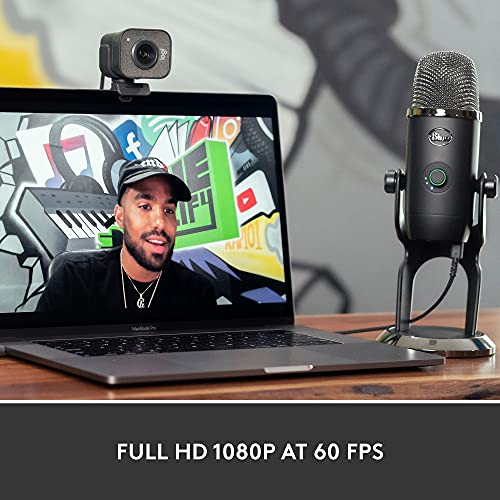
Logitech StreamCam Premium Webcam for Streaming and Content Creation, Full HD 1080p 60 fps, Works with Microsoft Teams, Google Meet, Zoom, Nintendo Switch 2’s new GameChat mode, for PC/Mac – Graphite


As an Amazon Associate we earn from qualifying purchases. Product prices and availability are accurate as of the date/time indicated.
The StreamCam is best for streamers who want a proven 1080p60 camera that can also shoot in portrait mode for TikTok and Shorts. It has a 78° glass lens at f/2.0, face-based autofocus and dual microphones on a built-in USB-C cable. The trade-off is resolution. It tops out at 1080p, and 60fps only works in MJPEG format, so it has less cropping headroom than the 4K picks above.
Elgato Facecam MK.2

Elgato Facecam MK.2, Premium Full HD Webcam, HDR


As an Amazon Associate we earn from qualifying purchases. Product prices and availability are accurate as of the date/time indicated.
The Facecam MK.2 is best for streamers who want Elgato’s control software at a lower price than the Facecam 4K. It records uncompressed 1080p60 over USB 3.0, adds 720p120 for slow-motion clips, and has a Sony STARVIS sensor around 1/2.5 inch with digital pan, tilt and zoom. Like its bigger sibling, it has fixed focus and no microphone, and it’s limited to 1080p.
OBSBOT Tiny 3

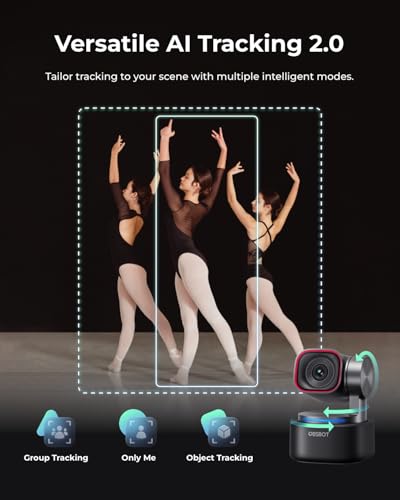
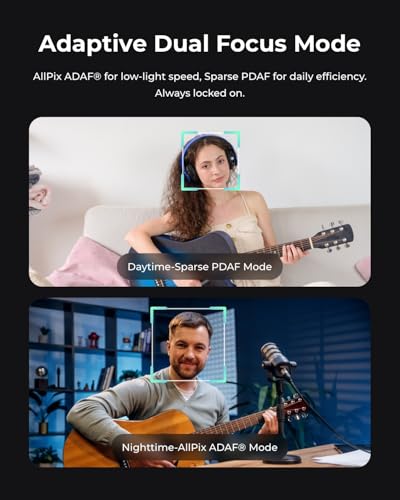
OBSBOT Tiny 3 AI-Powered Spatial Audio 4K Webcam, AI Tracking PTZ Camera




As an Amazon Associate we earn from qualifying purchases. Product prices and availability are accurate as of the date/time indicated.
The Tiny 3 is best for creators who want a gimbal tracking camera with a bigger sensor and much better audio. It uses a 1/1.28-inch 50MP sensor, records 4K30 or 1080p at up to 120fps, and has a three-mic spatial audio array with several recording modes. It sits in the premium tier, priced above the Insta360 Link 2 Pro, which will be enough tracking camera for most people.
Elgato Key Light
The Key Light is best for any streamer whose webcam looks noisy or flat. It’s an app-controlled LED panel rated at 2,800 lumens with adjustable colour temperature. Good lighting improves every camera in this guide more than moving up a price tier, especially the budget and fixed-focus picks. The trade-off is that it needs desk or wall space for its pole mount.
How We Chose
We built this list from research. We did not put these cameras through our own trials. We started with the cameras that appear most often in current 2026 streaming guides from established outlets and creator-focused review channels. Then we checked every model against the manufacturer’s own specification sheet. Where sources disagreed, for example on a field of view or HDR frame rate, we used the official figure. Where a spec isn’t published, we say so.
These were our criteria:
- Streaming formats: 1080p60 as a minimum, with extra credit for 4K60 or 1440p60.
- Sensor size and aperture: These are the best on-paper predictors of low-light quality.
- Focus system: PDAF and well-tuned fixed focus beat slow contrast-detect autofocus for live use.
- Software: OBS compatibility, manual exposure control and saved settings.
- Price spread: At least one strong option at every price tier.
- Currency: Current-generation models still sold new in 2026.
Expected image quality is an estimate based on sensor class, lens and published formats, not a measurement.
How to Choose a Streaming Webcam
Resolution and frame rate: is 4K worth it?
Most platforms deliver 1080p or lower to viewers, and many streamers broadcast at 720p60 or 1080p60 to save bandwidth. So the frame rate at 1080p matters more than the 4K label. Look for 1080p60 as a minimum. 4K is still useful as a source. It lets you crop a tight facecam from a wider shot and record sharper footage for edited YouTube videos. If you want that flexibility at smooth motion, choose a camera that does 4K60 or 1440p60, such as the Facecam 4K or Kiyo V2 Pro.
Sensor size: the low-light spec that matters
Megapixels say little about image quality. Sensor size says much more. As a rough guide, 1/2.5-inch to 1/2.55-inch sensors need good lighting. Sensors around 1/2 inch handle average rooms better. Sensors of 1/1.5 inch and larger, like the 1/1.3-inch and 1/1.2-inch chips in our premium picks, should hold up in dim evening setups. Aperture matters too. An f/1.7 to f/1.9 lens lets in far more light than f/4.0.
Autofocus or fixed focus?
Phase-detection autofocus (PDAF) locks quickly and rarely hunts, so it suits product demos. Contrast-detect autofocus can pulse in and out when you move. Fixed focus, as on Elgato’s Facecams, never hunts at all, but it’s tuned to a range of roughly 30 to 120cm. If you often hold objects within a hand’s length of the lens, pick PDAF.
Field of view
For one seated streamer, 70° to 80° is ideal. It frames your head and shoulders without showing the whole room. Go for 90° or wider if you stream with a co-host or want room to crop. Adjustable fields of view, like the MX Brio’s three settings, add flexibility without moving the camera.
Connection: USB 3.0 versus USB 2.0
Uncompressed 4K or high-frame-rate video needs USB 3.0 bandwidth. Over USB 2.0, cameras compress video to MJPEG, which adds a little processing load and can soften fine detail. Plug premium webcams into a rear USB 3.0 port on your PC rather than a hub, and check that the cable is the one supplied.
Tracking, framing and extras
Motorised gimbals (Insta360 Link 2 Pro, OBSBOT Tiny series) follow you with no loss of resolution. AI framing on fixed cameras crops the image digitally. Built-in microphones are a backup at best. Most streamers will sound far better with a dedicated USB or XLR mic. Privacy shutters, filter threads and onboard settings memory are small details that make day-to-day use easier.
Mistakes to Avoid When Buying a Streaming Webcam
Buying resolution instead of light. A 4K webcam in a dark room will look worse than a 1080p webcam under a good key light. Budget for lighting first if your room is dim.
Ignoring USB bandwidth. A 4K60 camera on a crowded front-panel port or an unpowered hub can drop frames or fall back to compressed modes. Use a direct USB 3.0 port.
Paying for tracking you won’t use. Gimbal cameras are brilliant for people who stand and move. If you sit still, a fixed camera with a bigger sensor per dollar is better value.
Relying on the built-in mic. Viewers forgive soft video more readily than bad audio. Even an entry-level USB microphone beats any webcam mic.
Forgetting software. Check that the camera’s settings save to the device or load reliably with OBS. If they don’t, exposure and white balance can reset after every reboot.
FAQ
What webcam do most streamers use?
Many streamers use Logitech, Elgato or Razer webcams. The Logitech C920 and StreamCam were long-time favourites, and 4K models like the Elgato Facecam 4K, Razer Kiyo Pro Ultra and Logitech MX Brio are now popular upgrades. Higher-end streamers often switch to mirrorless cameras with capture cards.
Is a 4K webcam worth it for streaming?
Yes, if you want cropping flexibility or record for YouTube. Live platforms usually deliver 1080p or less, so 4K mainly helps as a sharper source. Prioritise 1080p60, sensor size and lighting first. Then pick 4K60 if your budget allows.
Is 1080p60 good enough for Twitch?
Yes. 1080p60 is the highest format most Twitch streamers broadcast, and many use 720p60 or 936p60 to fit bitrate limits. A good 1080p60 camera with proper lighting looks excellent on Twitch.
Do I need autofocus on a streaming webcam?
Not always. Fixed focus tuned for desk distance never hunts, which is ideal for seated streams. Choose phase-detection autofocus if you often hold products close to the camera or move toward and away from it.
Can I use a webcam with OBS?
Yes. Every webcam in this guide works as a Video Capture Device in OBS Studio. For best results, set the resolution and frame rate manually in the device properties, and change the video format to MJPEG if 60fps doesn’t appear.
Webcam or mirrorless camera for streaming?
A mirrorless camera with a capture card gives better depth of field and low-light performance, but costs more and takes more setup. A premium webcam like the Kiyo Pro Ultra or Link 2 Pro gets surprisingly close with plug-and-play simplicity.
What lighting do I need for a webcam?
One soft key light in front of you, slightly above eye level, makes the biggest difference. Add a dim backlight or RGB accent behind you for depth. Avoid strong windows behind you, which force the camera to underexpose your face.
Which Webcam for Streaming Should You Buy?
- Most seated streamers: Elgato Facecam 4K, for uncompressed 4K60 and focus that never hunts.
- Dim rooms or a premium look: Razer Kiyo Pro Ultra, for the biggest sensor and an f/1.7 lens.
- You move around on camera: Insta360 Link 2 Pro, whose gimbal tracking keeps full resolution.
- Streams and work calls on one camera: Logitech MX Brio.
- Value 4K with fast autofocus: OBSBOT Meet 2.
- The latest 4K60 with AI framing: Razer Kiyo V2 Pro.
- First stream on a tight budget: EMEET S600. Spend what you save on a mic and a light.
Sources
- Elgato Facecam 4K and Facecam MK.2 technical specifications (Elgato)
- Razer Kiyo Pro Ultra and Kiyo V2 Pro product pages (Razer)
- Insta360 Link 2 Pro specifications (Insta360)
- Logitech MX Brio datasheet (Logitech)
- OBSBOT Meet 2 and Tiny 3 specifications (OBSBOT)
- EMEET S600 product specifications (EMEET)
Last updated: October 10, 2026
