
Key takeaways
- The top pick is the SANDISK 128GB Ultra Flair USB 3.0. It is the only drive in this group that handles large-file transfers at a speed modern workflows actually demand, and the metal build means it survives years of carry without the hinge failure that…
The concrete problem a flash drive solves is moving files between computers without a network connection: booting an installer, backing up documents before a wipe, or handing a presentation to a colleague on another machine. Knowing how to use a flash drive effectively starts with choosing hardware that matches the task, because the market spans from $8 bulk packs to premium metal-cased drives, and the difference between those extremes is interface speed, capacity headroom, and how reliably you can confirm your data actually landed before you unplug.
What separates a good purchase from a bad one is rarely the brand sticker. A $18 USB 2.0 drive with a fold cap will crawl on a 10GB file copy, while a $26 USB 3.0 drive with a metal shell will breeze through it. Owner reviews consistently flag slow write times and lost connector caps as the two biggest frustrations, so build quality and interface generation matter as much as raw gigabytes on the box. This roundup compares published specs, prices, and user feedback across eight drives to cut through that noise for 2026.
Our top picks






As an Amazon Associate we earn from qualifying purchases at no extra cost to you. Ratings are shown as listed on Amazon.
Quick Picks
| Product | Best for | Price |
|---|---|---|
| SANDISK 128GB Ultra Flair USB 3.0 | Fast large-file transfers | $25.95 |
| 2 Pack 64GB Fold USB 2.0 | Casual everyday handoffs | $18.99 |
| 128GB Aiibe USB 2.0 | Maximum capacity on a budget | $17.99 |
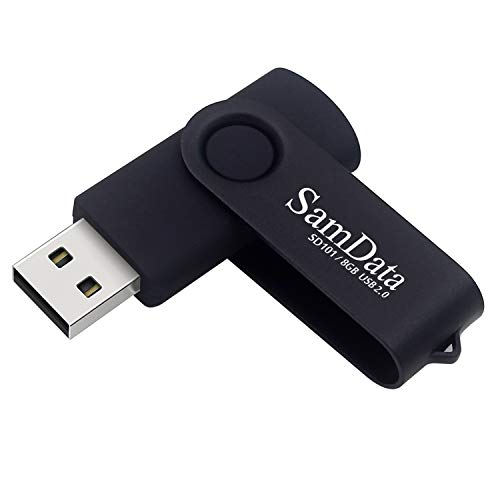
| SamData 8GB Swivel | Tiny files and legacy booting | $7.99 |
| SamData 32GB 2 Pack | Backup redundancy without mix-ups | $16.99 |
| Crystal 32GB LED | Gifts and decorative handoffs | $14.99 |
| SamData 8GB 5 Pack | Distributing files to a group | $21.99 |
| 1GB Wooolken 2 Pack | BIOS updates and firmware flashes | $8.79 |
How We Picked
Four criteria drove this selection. First, interface generation: USB 3.0 drives deliver a qualitatively different experience for multi-gigabyte files compared to USB 2.0, and that difference shows up in owner complaints about transfer times. Second, capacity-to-price ratio, because overpaying for gigabytes you never fill wastes budget that could go toward a faster interface. Third, form factor durability and cap retention, since swivel and fold designs consistently earn higher satisfaction scores from people who carry drives daily. Fourth, transfer-confirmation features like LED indicators, which prevent the single most common data-loss mistake: pulling a drive mid-write.
The 8 Best How To Use A Flash Drive in 2026
SANDISK 128GB Ultra Flair USB 3.0 Flash Drive
This is the pick for anyone who regularly moves large files between machines and wants the transfer over in seconds rather than minutes. The USB 3.0 interface is the only one in this lineup, which means sustained write speeds that USB 2.0 drives here physically cannot match. The metal casing resists pocket and bag wear that plastic housings accumulate over months of daily carry. Owners flag the price as a downside if your actual file sizes are modest, because you are paying a premium for speed you may not need. Skip this drive if your typical transfers are single documents, spreadsheets, or small images where interface generation is irrelevant and the extra cost buys you nothing.
2 Pack 64GB Fold USB 2.0 Thumb Drives
Ideal for people who want two drives under one purchase: one for home, one for work, or a matched backup pair. The fold design protects the connector without a separate cap you might lose, which addresses the top complaint in single-drive reviews. Two 64GB drives for $18.99 is hard to beat on capacity-per-dollar in this group. The USB 2.0 interface is the clear weakness here; large file copies run noticeably slower than what the Sandisk above offers. Skip this pair if you routinely move multi-gigabyte archives, video projects, or database dumps where write speed dictates whether you actually wait for the transfer or walk away.
128GB Aiibe USB 2.0 Flash Drive
For budget buyers who need the most storage per dollar in a single drive, this 128GB unit at $17.99 wins on raw capacity. It is plug-and-play with no software or formatting step, so it works immediately on any machine with a USB port. Owners appreciate the generous space for photo libraries, document archives, or software collections. The tradeoff is the USB 2.0 interface, which bottlenecks throughput no matter how much storage you are filling. A 128GB drive that takes an hour to write is frustrating when a $26 drive does it in a fraction of the time. Skip this drive if your workflow involves anything beyond occasional single-file saves.
SamData 8GB USB 2.0 Thumb Drive with LED Indicator
Targeted at occasional users who need to move small documents, boot a lightweight installer, or carry a PDF collection between machines. The swivel mechanism protects the connector and eliminates the lost-cap problem entirely, while the LED indicator lights during read and write activity so you can visually confirm the transfer finished before unplugging. This last point matters because mid-write removal is the leading cause of corrupted files on budget drives. At $7.99 it is the cheapest drive here by a wide margin. The 8GB capacity is the obvious limitation for modern file sizes. Skip this drive if you need more than a few documents and spreadsheets in a single session.
SamData 32GB USB Flash Drives 2 Pack
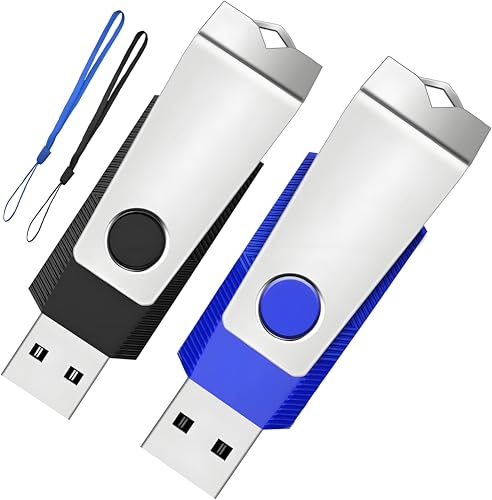
Best suited for anyone building a habit of backing up before deleting, because owning two drives at once removes the excuse that you forgot your only drive somewhere. Each unit has an LED light that confirms write activity, and the two included colors (black and blue) let you distinguish drives by sight even when they look identical in a bag. At $16.99 for two 32GB drives, the per-gigabyte cost is competitive with single-drive options. The USB 2.0 interface limits speed on large files. Skip this pair if you only ever transfer one small file at a time and see no value in a second drive as insurance.
Crystal USB Flash Drive 3.0 LED Lighting Memory Stick (32GB)
Aimed squarely at buyers looking for a visually distinctive drive for gifts, wedding favors, party giveaways, or holiday presents. The crystal housing and built-in LED lighting make it memorable in a way that plastic swivel drives never achieve, and 32GB handles most photo-and-document bundles a guest might receive. At $14.99 it sits in a reasonable middle band. The downsides are the absence of published brand-name controller specs and no warranty information listed, which makes it a poor fit for sensitive data. Skip this drive for mission-critical backups or anything where reliability outweighs presentation.
SamData 8GB USB Flash Drives 5 Pack
Designed for teachers, office managers, event coordinators, or anyone distributing files to a group simultaneously. Five distinct colors mean five people can identify their drive instantly at the end of a session, eliminating the sorting-back problem that plagues identical black drives. The LED indicator on each unit confirms completion before a user pulls the drive. At $21.99 for five drives the per-unit cost is $4.40, which is the cheapest per-drive price in this list. The 8GB-per-drive capacity is tight if your files include images or video. Skip this pack if your audience needs more than a few megabytes each or if they all arrive with phones for QR-code distribution instead.
1GB Flash Drive 2 Pack, Wooolken USB 2.0
Niche but genuinely useful for firmware updates, BIOS flashes, or legacy systems that format large-capacity USB media poorly or cannot boot from partitions above a few gigabytes. Older industrial controllers, point-of-sale terminals, and vintage BIOS utilities often require small volumes to initialize correctly. Two 1GB drives for $8.79 covers that need without buying a 128GB drive you will never fill. The downside is obvious: 1GB is impractical for anything modern beyond a single executable or a tiny configuration file. Skip this pack if you are transferring files measured in hundreds of megabytes or gigabytes, where you would waste time filling and managing capacity.
Buying Guide
Interface Speed: USB 2.0 vs 3.0
USB 3.0 supports theoretical transfer rates several times higher than USB 2.0, but the real-world difference shows up most on sustained writes to large files. For a 50MB document, both interfaces feel instant. For a 5GB video archive, the gap widens from a quick copy to a multi-minute wait. If your primary use case involves media files, disk images, or database exports, pay the premium for USB 3.0. For small document transfers, USB 2.0 saves money without a perceptible penalty.
Form Factor and Cap Retention
Swivel and fold designs protect the connector and eliminate the separate cap that gets lost within weeks of use in many reviews. Metal housings resist scratches and dings better than plastic. If you carry a drive in a pocket, bag, or keychain daily, prioritize swivel or fold mechanisms over decorative shells. A drive that cannot be connected because its cap went missing in a couch cushion is useless regardless of its gigabytes.
LED Indicators and Transfer Confirmation
The single most common cause of file corruption on flash drives is unplugging mid-write. An LED that illuminates during active read or write gives you a visual cue to wait before pulling the drive. Several products in this list include one; those that do not require you to watch the file progress bar in your operating system. For users who multitask or step away during transfers, this feature is worth weighing alongside raw specs.
Our Verdict
The top pick is the SANDISK 128GB Ultra Flair USB 3.0. It is the only drive in this group that handles large-file transfers at a speed modern workflows actually demand, and the metal build means it survives years of carry without the hinge failure that plagues folding plastic designs. For a budget pick, the SamData 8GB Swivel at $7.99 delivers solid capacity for document-based use, a swivel cap that never gets lost, and an LED that prevents mid-write removal. If your priority is redundancy over speed, the SamData 32GB 2 Pack wins the value argument because owning two drives eliminates the single-drive dependency that leads to forgotten backups.
FAQ
What is the correct way to eject a flash drive?
Use your operating system’s eject function (right-click the drive icon on Windows, or drag the drive to the eject indicator on macOS) and wait for the confirmation prompt before pulling it. Even with an LED indicator showing activity, the eject step ensures the file system flushes its write cache to the drive.
Why does my 64GB drive show less than 64GB of usable space?
Manufacturers advertise in decimal gigabytes (1,000-based), while operating systems report in binary gibibytes (1,024-based), which automatically reduces the displayed number. Formatting and file system metadata consume additional space, so a 64GB drive typically shows around 57-59GB available. This is not a defect.
Can a flash drive fail permanently?
Yes. Flash memory has a finite write cycle count, and the controller can fail from power surges, heat, or physical damage. Drives used for daily read-write workloads have a shorter lifespan than those used for occasional archival storage. If data matters, always keep a second copy on another medium.
How many files can I store on a 32GB flash drive?
That depends entirely on file size. A 32GB drive holds roughly 6,400 five-megabyte images, or about 30,000 one-megabyte PDFs, or a single 30GB video file. There is no fixed file-count limit beyond the file system’s maximum (FAT32 caps individual files at 4GB, while exFAT does not).






