
Picking the best logitech mouse sounds simple until you realize the brand ships everything from a thirteen-dollar office clicker to a hundred-and-seventy-dollar esports tool with haptic feedback. The wrong choice costs you more than money: a productivity user stuck with a lightweight gaming shell will feel fatigued by mid-afternoon, while a competitive shooter buying an ergonomic work mouse will lose every flick duel. The real question is not which mouse is objectively best but which form factor, sensor class, and connectivity style matches the way you actually use a computer.
What separates a strong pick from a mediocre one in the Logitech lineup comes down to three concrete factors: sensor quality relative to your use case, battery or cable strategy for your session length, and whether the button layout matches the software you run daily. Below we compare eight current models across those dimensions using published specifications and aggregated owner feedback from 2026, so you can match a mouse to a workflow without reading a single marketing brochure.
Our top picks
 Logitech G305 Lightspeed Wireless Gaming Mouse
- The next-generation optical HERO sensor delivers incredible performance…
- Ultra-fast LIGHTSPEED wireless technology gives you a lag-free…
- G305 wireless mouse boasts an incredible 250 hours…
 Logitech M185 Compact Ambidextrous 2.4 GHz Wireless
- Compact Mouse: With a comfortable and contoured shape,…
- Durable and Reliable: This USB wireless mouse features…
- Universal Compatibility: Your Logitech mouse works with your…
 Logitech MX Master 4 Ergonomic Wireless Mouse
- Precision you can feel with the Haptic Sense…
- Effortlessly access favorite tools with Actions Ring (2)…
- Scroll 1,000 lines per second and stop on…
| Product | Key specs | |
|---|---|---|
| Logitech G305 Lightspeed Wireless Gaming Mouse | The next-generation optical HERO sensor delivers incredible performance… Ultra-fast LIGHTSPEED wireless technology gives you a lag-free… G305 wireless mouse boasts an incredible 250 hours… | Check price |
| Logitech M185 Compact Ambidextrous 2.4 GHz Wireless | Compact Mouse: With a comfortable and contoured shape,… Durable and Reliable: This USB wireless mouse features… Universal Compatibility: Your Logitech mouse works with your… | Check price |
| Logitech MX Master 4 Ergonomic Wireless Mouse | Precision you can feel with the Haptic Sense… Effortlessly access favorite tools with Actions Ring (2)… Scroll 1,000 lines per second and stop on… | Check price |
 Logitech M510 Full Size Ambidextrous 2.4 GHz Logitech M510 Full Size Ambidextrous 2.4 GHz | Your hand can relax in comfort hour after… You’ve got the control to do more, faster Two years of battery life practically eliminates the… | Check price |
 Logitech M720 Triathalon Full Size Multi-Device Wireless Logitech M720 Triathalon Full Size Multi-Device Wireless | Long-lasting and Versatile: Designed for endurance with 24-month… Comfortable Grip: Crafted for the right hand, this… Hyper-Fast Scrolling: Fly through long documents and web… | Check price |
 Logitech G502 Hero Wired Gaming Mouse Logitech G502 Hero Wired Gaming Mouse | HERO Gaming Sensor: Next generation HERO mouse sensor… 11 programmable buttons and dual mode hyper-fast scroll… Adjustable weights: Match your playing style | Check price |
 Logitech G PRO X2 SUPERSTRIKE Wireless Gaming Logitech G PRO X2 SUPERSTRIKE Wireless Gaming | Designed With Pros, Engineered to Win: Designed alongside… Dominate with industry-leading speed: 30 ms faster clicks… Haptic Feedback: This breakthrough haptic gaming mouse with… | Check price |
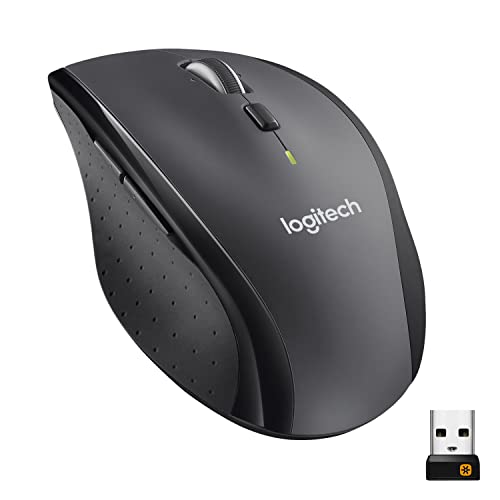 Logitech M705 Marathon Full Size 2.4 GHz Logitech M705 Marathon Full Size 2.4 GHz | Click more Hyper-fast scrolling lets you fly through long documents… The sculpted, right-hand shape guides your hand to… | Check price |
As an Amazon Associate we earn from qualifying purchases at no extra cost to you.
Quick Picks
| Product | Best for | Price |
|---|---|---|
| G305 Lightspeed | Budget wireless gaming | $29.99 |
| M185 | Simple everyday computing | $13.97 |
| MX Master 4 | Professional productivity | $119.99 |
| M510 | Large-hand office work | $27.99 |
| M720 Triathlon | Multi-device workflows | $34.95 |
| G502 Hero | Feature-rich wired gaming | $37.99 |
| G PRO X2 SUPERSTRIKE | Competitive FPS at any budget | $177.49 |
| M705 Marathon | Long battery life on desktop | $39.99 |
How We Picked
For a roundup that spans gaming and office use, we narrowed the field by sensor reliability at common polling rates, battery endurance versus session length (a six-hour workday or a tournament bracket changes what matters), shape and size coverage for different hand geometries, and price-to-feature ratio judged against what owners report after months of daily use rather than first-week impressions.
The 8 Best Logitech Mouse in 2026
Logitech G305 Lightspeed Wireless Gaming Mouse
The G305 is the entry point for anyone who wants wireless freedom without a wireless price tag. Its HERO sensor tracks up to twelve thousand DPI, which is more than sufficient for every mainstream game, and the single AA cell delivers roughly two hundred and fifty hours of use. Symmetrical shape suits claw and fingertip grips comfortably.
- Pro: Aggressive sub-$30 price makes wireless gaming accessible without compromise on tracking quality.
- Pro: Near-limitless battery life from a standard AA eliminates charging interruptions entirely.
- Con: Only six programmable buttons; users who rely on thumb macros will feel limited.
Skip this mouse if you play games that demand rapid polling above a thousand hertz or if you need more than a side-pair of buttons for ability hotkeys.
Logitech M185 Compact Ambidextrous 2.4 GHz Wireless Mouse
The M185 is the mouse you buy in bulk for a home office, a school lab, or a second desk. It has no software layer, no RGB, and no shape ambition—just a small ambidextrous shell that works the moment the nano receiver is inserted.
- Pro: Under fourteen dollars makes it the cheapest reliable wireless option in the lineup.
- Pro: Symmetrical profile lets left-handers and right-handers share a single unit without friction.
- Con: Basic sensor struggles on glass or high-gloss surfaces; DPI is fixed and low.
Skip this mouse if you do any precision work—photo editing, CAD, or competitive gaming—because the sensor simply is not built for it.
Logitech MX Master 4 Ergonomic Wireless Mouse with Haptics
The MX Master 4 is Logitech’s flagship productivity mouse and the one most frequently recommended in 2026 for professional workflows. The new haptic feedback adds a tactile confirmation layer for scrolling and button presses without visual distraction. The sculpted right-hand shape supports full-palm grip, and the MagSpeed scroll wheel handles thousands of lines per second.
- Pro: Haptic engine provides precise feedback cues for multi-monitor and creative-suite navigation.
- Pro: USB-C fast charging gives a full day of use from a minute of charge time.
- Con: At one hundred and twenty dollars, it is the most expensive non-gaming option here.
Skip this mouse if you have a small hand or prefer a lightweight shell; the sculpted body and heft will fight your grip style.
Logitech M510 Full Size Ambidextrous 2.4 GHz Wireless Mouse
The M510 fills a gap between the compact M185 and the feature-heavy M720. It offers a full-size ambidextrous body with a tilt wheel and USB receiver storage—useful for people who carry a laptop between locations and want a larger surface to rest a full hand on.
- Pro: Full-size shell supports palm grip without forcing fingers into a cramped position.
- Pro: Tilt wheel enables horizontal scrolling without keyboard modifiers.
- Con: Fixed two-way scroll wheel cannot free-spin, so long documents require more wheel rotations than on the M720.
Skip this mouse if you frequently scroll through large spreadsheets or code files; the lack of hyper-scroll will slow you down noticeably.
Logitech M720 Triathlon Full Size Multi-Device Wireless Mouse
The M720 is built for people who switch between a desktop, a laptop, and a tablet during a single work session. Three Easy-Switch channels let you jump between paired devices in under a second, and the micro-USB rechargeable cell lasts roughly seventy-five hours per charge. SmartWheel free-spin mode is the headline feature for document-heavy users.
- Pro: Genuine multi-device pairing with hardware-level switching—no software required on the receiving end.
- Pro: Hyper-scroll wheel handles thousands of rows without fatigue on long spreadsheets.
- Con: Micro-USB charging port feels dated next to the MX Master 4’s USB-C.
Skip this mouse if you only ever use one device; the switching hardware adds price without benefit.
Logitech G502 Hero Wired Gaming Mouse
The G502 Hero remains one of the most recommended gaming mice in any best logitech mouse conversation because of its button count and adjustable weight system. Eleven programmable buttons cover ability-heavy MMOs and strategy games, while tunable weights let users dial in resistance for slow tracking or quick flicks.
- Pro: Eleven buttons plus weight tuning create an unusually wide range of personalized setups from one shell.
- Pro: HERO 25K sensor offers headroom that exceeds what most current displays and games require.
- Con: Wired-only; the cable adds drag that some players find distracting despite the relatively light design.
Skip this mouse if you play competitive FPS at high sensitivity; the shell is long and button-heavy, which fights wrist-flick technique.
Logitech G PRO X2 SUPERSTRIKE Wireless Gaming Mouse
The G PRO X2 SUPERSTRIKE is Logitech’s answer to the question “what if the shape everyone already loves could actuate before the click physically registers?” Its optical-mechanical hybrid switch eliminates debounce delay, delivering near-zero actuation distance. The LIGHTSPEED sensor polls at high rates over wireless, and the symmetrical shell weighs very little.
- Pro: Hybrid switch technology removes pre-travel and debounce lag, giving measurable input-to-action reduction.
- Pro: Low weight and reliable wireless make it viable for tournament play without tether anxiety.
- Con: Price places it firmly in enthusiast territory; the performance gain over the G305 is real but narrow for casual play.
Skip this mouse unless you are a serious competitive player who can perceive the difference between a wired and a high-end wireless sensor.
Logitech M705 Marathon Full Size 2.4 GHz Wireless Mouse
The M705 Marathon earns its name through a claimed three-year battery life from two AA cells, making it ideal for users who dislike charging cycles entirely. The free-spin scroll wheel handles long documents, and the ambidextrous shape with side buttons accommodates both hand sizes.
- Pro: Multi-year battery endurance removes the charging chore for users who prefer set-and-forget hardware.
- Pro: Free-spin scroll wheel covers productivity needs at a mid-range price.
- Con: Basic sensor and aging design mean it is outclassed on tracking by every other option above thirty dollars.
Skip this mouse if you value sensor precision or plan to use it for anything beyond web browsing and document editing.
Buying Guide
Shape and Size Match Your Grip
Symmetrical shells like the G305 and G PRO X2 suit claw and fingertip grips but can cause palm discomfort for large hands. Sculpted right-hand designs like the MX Master 4 support full-palm rest but exclude left-handers entirely. Measure your hand from wrist crease to middle fingertip; anything under seventeen centimeters benefits from compact or mid-size shells, while larger hands need full-size ergonomics.
Wireless Protocol and Latency Tolerance
Logitech uses two wireless tiers: standard 2.4 GHz on office mice and LIGHTSPEED on gaming models. For casual computing, the difference is invisible. For competitive play, LIGHTSPEED closes the gap with wired latency enough that the G PRO X2 SUPERSTRIKE can match top-tier wired sensors. If your work involves audio or video production where a dropped frame matters, prefer wired or ensure the receiver sits within a short range.
Button Layout Versus Software Dependency
More buttons mean more capability only if you use them. The G502’s eleven inputs shine in games with large ability bars but become dead weight in productivity apps. Office mice with three or four buttons and a tilt wheel cover horizontal scrolling and browser navigation without requiring a software layer. Decide whether you will configure macros or accept the default layout before paying for extra switches you will never bind.
Our Verdict
Top pick: the MX Master 4 is the best logitech mouse for the widest range of professional users in 2026 because its haptic feedback, multi-device pairing, and sculpted ergonomics address the most common daily complaints about work mice. Budget pick: the G305 Lightspeed at under thirty dollars delivers wireless gaming performance that was reserved for hundred-dollar products a few years ago. Conditional winner: if you switch between three or more computers during a workday, the M720 Triathlon replaces a stack of dedicated mice with one unit and is worth its price premium over the M510 despite lacking USB-C.
FAQ
Is the G502 still worth buying when wireless options exist?
Yes, if you prefer the maximum button count and do not mind a cable. The G502 Hero’s eleven-programmable layout and adjustable weights remain unmatched by any wireless Logitech gaming mouse at its price, making it a strong choice for MMO and strategy players who value input density over wireless freedom.
Can Logitech gaming mice be used for productivity work?
They can, but the ergonomic trade-off is real. Gaming shells prioritize low weight and forward balance, which causes palm fatigue over eight-hour workdays. If you need both gaming and office capability from a single mouse, the MX Master 4 handles gaming at a recreational level while remaining comfortable for professional use.
Do multi-device mice like the M720 work without software?
Basic switching works out of the box through hardware buttons on the mouse itself. However, reassigning buttons, adjusting scroll speed, and managing paired devices through Flow cross-computer control all require the Logi Options application installed on each host machine.
What sensor type does Logitech use in its budget mice?
Entry-level models like the M185 and M510 use basic optical sensors with fixed low DPI, sufficient for web browsing and document work on matte surfaces. The G305 is the cheapest Logitech mouse to include a HERO sensor with twelve-thousand-DPI capability, bridging the gap between office tracking and gaming-grade precision.









