Our Short List of 3

- Screen: 15.6-inch IPS, 1920 x 1080, 60 Hz, matte finish
- Touch: 10-point projective capacitive, stylus pen included
- Brightness: 250 cd/m2; contrast ratio 800:1
- Ports: 2 x USB-C (one with up to 60W two-way power), mini HDMI, 3.5 mm audio

- Screen: 15.6-inch IPS, 1920 x 1080, 60 Hz, anti-glare
- Touch: 10-point capacitive, ZenScreen pen included
- Brightness: 250 cd/m2; contrast ratio 700:1; response time 5 ms (gray to gray)
- Battery: 7800 mAh built in, rated up to 4 hours by ASUS
- Screen: 15.6-inch IPS, 1920 x 1080, 60 Hz
- Touch: 10-point capacitive, works via USB connection
- Brightness: 250 cd/m2; contrast ratio 700:1; response time 4 ms (gray to gray)
- Battery: 8000 mAh built in, can double as a USB-C power bank
All 4 Picks at a Glance
| Product | Specs | Action |
|---|---|---|
| 1. ViewSonic TD1655 |
| Check price on Amazon |
| 2. ASUS ZenScreen Touch MB16AMT |
| Check price on Amazon |
| 4. AOC 16T2 |
| Check price on Amazon |
 5. espresso Display 15 Touch |
| Check price on Amazon |
Key takeaways
- Compare the best touchscreen portable monitors with 10-point touch, USB-C video and travel-ready stands, from compact 14-inch panels to 15.6-inch picks.
A touchscreen portable monitor turns a laptop into a more flexible workstation: you gain a second screen for documents, calls or timelines, and you can tap, swipe and annotate directly on it instead of reaching for a mouse. That makes these panels popular for presentations, point-of-sale setups, field work, and any job where the screen gets shared across a table.
The catch is that touch support depends heavily on the connection and the operating system. A single USB-C cable usually carries video, power and touch together, while an HDMI feed needs a separate USB data link before taps register. The five models below all offer 10-point capacitive touch and USB-C video input, but differ in size, battery options, pen support and how well they play with Windows, macOS and Android.
As an Amazon Associate, we earn from qualifying purchases.
Our top picks
Quick Answer
For most people, the ViewSonic TD1655 is the safest touchscreen portable monitor: a 15.6-inch Full HD IPS panel with 10-point touch, two USB-C ports, a built-in stand and an included stylus. The ASUS ZenScreen Touch MB16AMT and AOC 16T2 add built-in batteries for cable-free sessions, the Lenovo ThinkVision M14t is the compact pen-friendly option, and the espresso Display 15 Touch is the slim premium pick for Mac and Windows users.
1. ViewSonic TD1655
- Screen: 15.6-inch IPS, 1920 x 1080, 60 Hz, matte finish
- Touch: 10-point projective capacitive, stylus pen included
- Brightness: 250 cd/m2; contrast ratio 800:1
- Ports: 2 x USB-C (one with up to 60W two-way power), mini HDMI, 3.5 mm audio
The TD1655 is the balanced choice in this category. Its 15.6-inch IPS panel runs at 1920 x 1080 with a matte finish, and the 10-point projective capacitive touchscreen supports the usual taps, pinches and swipes, with a passive stylus included in the box for notes and signatures. A built-in stand and a smart cover are part of the package, so it is ready to prop up on a desk or meeting table without extra accessories.
Connectivity is a strong point. One USB-C port handles video and touch, and a second USB-C port supports two-way power up to 60W, so an adapter or power bank plugged into the monitor can pass charge through to a connected laptop. A mini HDMI input covers devices without USB-C video, though touch over HDMI still needs a USB data cable connected, which is standard for this category.
2. ASUS ZenScreen Touch MB16AMT
- Screen: 15.6-inch IPS, 1920 x 1080, 60 Hz, anti-glare
- Touch: 10-point capacitive, ZenScreen pen included
- Brightness: 250 cd/m2; contrast ratio 700:1; response time 5 ms (gray to gray)
- Battery: 7800 mAh built in, rated up to 4 hours by ASUS
The MB16AMT stands out because it carries its own power. A built-in 7800 mAh battery is rated by ASUS for up to four hours of use, which suits presentations, site visits and any setting where hunting for a spare outlet is a hassle. The 15.6-inch Full HD IPS panel has 10-point capacitive touch and an anti-glare coating, and the foldable smart case doubles as a stand for landscape or portrait use. A ZenScreen pen is included for annotation.
Its hybrid-signal USB-C port works with USB-C sources carrying DisplayPort Alt Mode, and ASUS notes that a DisplayLink driver is needed when connecting over USB Type-A. A micro HDMI port covers consoles, cameras and older laptops. One important limitation: full touch works with Windows and Android, while touch support on macOS is limited, so Mac users should treat this mainly as a display with partial touch rather than a full touch surface.
3. Lenovo ThinkVision M14t
The M14t is the pick for people who want touch and pen input in the smallest bag footprint. The 14-inch Full HD panel supports 10-point touch plus a pressure-sensitive active pen, which makes it better suited to sketching, handwriting and precise annotation than the passive styluses bundled with most rivals. At 698 grams it is noticeably lighter than the 15.6-inch models, and the stand tilts from minus 5 to 90 degrees with a small height adjustment, which helps when signing or drawing at a desk.
Two USB-C ports handle video, touch and power pass-through, and a protective sleeve is included for travel. The trade-offs are the smaller screen area, which can feel tight for split-screen multitasking, and a Windows-first focus: Lenovo positions it around ThinkPad and other USB-C laptops. If your workflow is pen-first and bag space is limited, this is the natural fit.
Specs
- Screen: 14-inch, 1920 x 1080, 60 Hz
- Touch: 10-point touch with pressure-sensitive active pen support
- Brightness: 300 cd/m2; contrast ratio 700:1; response time 6 ms
- Ports: 2 x USB-C
- Stand: tilt from minus 5 to 90 degrees, height adjustable
- Weight: 698 g
- Extras: protective sleeve and L-shaped cable dongle included
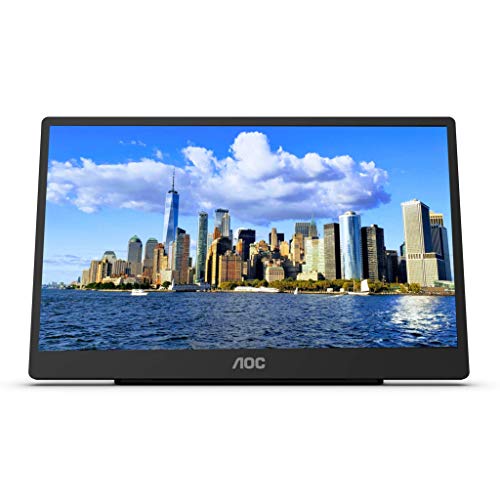
4. AOC 16T2
- Screen: 15.6-inch IPS, 1920 x 1080, 60 Hz
- Touch: 10-point capacitive, works via USB connection
- Brightness: 250 cd/m2; contrast ratio 700:1; response time 4 ms (gray to gray)
- Battery: 8000 mAh built in, can double as a USB-C power bank
The 16T2 is AOC’s battery-equipped entry. Its 8000 mAh battery is rated for up to four hours of use and can also work in reverse as a power bank for a USB-C phone, which is a genuinely useful trick on travel days. The 15.6-inch IPS panel delivers Full HD resolution with 10-point capacitive touch that runs through the USB connection, and built-in speakers handle basic audio for calls and clips without extra gear.
Two USB-C ports and a micro HDMI input give it flexible wiring options, and the included smart cover folds into a stand for landscape or portrait orientation. At 9 mm thin and about 1 kg without the cover, it stays easy to carry. As with the ASUS, full touch is a Windows and Android story, and HDMI users should confirm on the listing which cables the current package includes.
5. espresso Display 15 Touch
- Screen: 15-inch class, 1920 x 1080 touchscreen
- Touch: multi-touch with stylus support as listed; espressoFlow software adds macOS touch features
- Ports: USB-C (single-cable video, power and touch)
- Body: ultra-slim aluminum, magnetic stand system
The espresso Display 15 Touch is the premium, design-led option. It pairs a 15-inch class Full HD touchscreen with an ultra-slim aluminum body and a magnetic stand system, and it is one of the few portable touch monitors that actively courts Mac users: the maker’s espressoFlow software enables touch and gesture features on macOS, where most rivals offer little or no touch support. A single USB-C cable carries video, power and touch to compatible laptops.
That polish comes with a simpler hardware package than the business models above. There is no built-in battery, and the port selection centers on USB-C, so HDMI-only devices need an adapter path confirmed before buying. Buyers who move between Windows and Mac machines will find the trade worthwhile; everyone else can get similar panel specs for less from the picks above.
How to Choose a Touchscreen Portable Monitor
Start with the connection. A laptop with a full-function USB-C or Thunderbolt port is the ideal host, because one cable then carries the picture, the touch data and power. If your machine only has HDMI, budget for the extra USB data cable that touch requires, and expect a slightly messier desk. Phones with desktop modes, such as Samsung DeX, can also drive most of these panels over USB-C.
Next, check operating system support before anything else. Touch works most completely on Windows and Android across this category. macOS historically receives limited or no touch input from portable monitors, with the espresso Display and driver-supported models like the ViewSonic being partial exceptions, so Mac-first buyers should read the listing’s compatibility notes carefully.
Then decide on power. Bus-powered models are lighter and simpler, but they draw from your laptop battery. The ASUS MB16AMT and AOC 16T2 carry their own batteries, which adds weight yet frees you from outlets during presentations. Finally, weigh size and input style: 14-inch panels travel best, 15.6-inch panels suit shared viewing, and anyone planning to write or draw should prioritize active pen support like the M14t offers.
Who Should Skip a Touchscreen Portable Monitor
Skip the touch premium if your second screen will only hold chat windows, reference documents or a video call, since a non-touch portable monitor does that job for less money. Gamers should also look elsewhere: these are 60 Hz productivity displays, not high-refresh gaming panels. If your laptop lacks USB-C video output and has no HDMI either, none of these will connect without additional hardware. And if touch on macOS is the entire point of the purchase, verify support twice, because it is the most common disappointment in this category.
Frequently Asked Questions
Does touch work over HDMI, or only over USB-C?
On the models in this guide, touch data travels over USB. A USB-C connection with DisplayPort Alt Mode carries video and touch in one cable. If you feed the picture in over HDMI or micro HDMI, you also need a USB cable connected between the monitor and the computer before taps and swipes register.
Will a touchscreen portable monitor work with a Mac?
The display itself will work as a second screen on a Mac with USB-C video output. Touch is the limited part: most portable touch monitors offer full touch only on Windows and Android. The espresso Display 15 Touch uses its espressoFlow software to enable touch features on macOS, and ViewSonic offers a touch driver for Mac, so check the listing for your exact model.
Can one cable really power the monitor and carry touch?
Yes, when the host port is a full-function USB-C or Thunderbolt port with DisplayPort Alt Mode. That single cable delivers the video signal, the USB touch data and power to the monitor. Charging-only USB-C ports cannot send video, so confirm your laptop or phone port supports video output before relying on a one-cable setup.
Is a built-in battery worth it in a portable monitor?
It depends on where you work. A battery model like the ASUS MB16AMT or AOC 16T2 keeps running during presentations, inspections and travel without draining your laptop or needing a nearby outlet, and the AOC can even top up a phone. The trade-off is extra weight and one more device to recharge, so desk-based users usually do not need it.
Final Verdict
The ViewSonic TD1655 is the easiest recommendation for most buyers, pairing a proven 15.6-inch touch panel with flexible two-way USB-C power and a proper warranty. Choose the ASUS ZenScreen Touch MB16AMT or AOC 16T2 when a built-in battery matters, the Lenovo ThinkVision M14t when pen input and low weight come first, and the espresso Display 15 Touch when you want the slimmest design with the friendliest path to touch on a Mac.
Product and ASIN Reference
| Product | ASIN |
|---|---|
| ViewSonic TD1655 15.6-inch Touchscreen Portable Monitor | B08778F756 |
| ASUS ZenScreen Touch MB16AMT 15.6-inch Portable Monitor | B07WC2NL2G |
| Lenovo ThinkVision M14t 14-inch Touch Portable Monitor | B08L6SLRG6 |
| AOC 16T2 15.6-inch Portable Touchscreen Monitor | B08FJJJ5H8 |
| espresso Display 15 Touch Portable Monitor | B0D9Q3HYJB |
More from Amazon
Programs that pair well with the guide above. Offers and eligibility are set by Amazon and may change.
Free shipping on eligible items, Prime Video and more. Eligible new members can start with a free trial.
Start a Prime free trialAd-free music streaming. Eligible new subscribers can start with a free trial.
Try Music Unlimited freeA Prime membership for ages 18-24 with a trial period. Eligibility is set by Amazon.
See Prime for Young AdultsAudiobooks and podcasts to listen to on the go. Eligible new members can start with a free trial.
Try Audible freeAs an Amazon Associate we earn from qualifying purchases.