
Our Top Picks
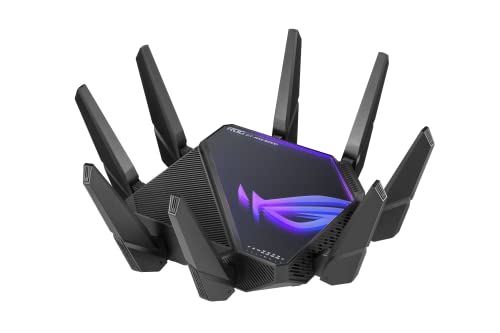
 ASUS ROG Rapture GT-BE98 Pro WiFi 7 GamingQuad-Band13.7 x 8.6 x 13.7 inches4.4 poundsCheck on Amazon
A gaming router cannot shorten the distance between your home and a game server, and it cannot fix a slow internet plan. What it can do is manage the traffic inside your home: giving game packets priority over a cloud backup, keeping a console on a clean channel, and offering wired ports fast enough for a gaming PC. That local traffic management is where the five routers below differ, and it is what this guide compares.
The picks span three Wi-Fi generations: Wi-Fi 6 models cover the features most households use, Wi-Fi 6E adds the 6 GHz band, and Wi-Fi 7 adds wider 320 MHz channels and Multi-Link Operation for homes with Wi-Fi 7 devices and multi-gig internet.
As an Amazon Associate, we earn from qualifying purchases.
Quick answer
For most gaming households, the ASUS RT-AX86U Pro covers the basics well with a dedicated gaming port and a 2.5G port, while the NETGEAR XR1000 adds DumaOS server filtering. Homes with multi-gig internet and Wi-Fi 7 devices can step up to the TP-Link Archer GE800 or the ASUS GT-BE98 Pro for 10G ports and wider channels.
1. ASUS ROG Rapture GT-BE98 Pro
The GT-BE98 Pro is ASUS’s quad-band Wi-Fi 7 flagship, built around two separate 6 GHz radios alongside the usual 5 GHz and 2.4 GHz bands. That second 6 GHz radio can serve as a clean band for gaming or as a dedicated wireless backhaul in an AiMesh network. ASUS rates the combined throughput at up to 30 Gbps across all four bands, a theoretical figure that describes total capacity rather than the speed any single device will see.
Wired connectivity is the other headline: two 10G ports and four 2.5G ports cover multi-gig internet plans and fast local devices. Triple-level Game Acceleration prioritizes game traffic at the device, port and server-routing level, and the security suite is subscription-free.
Specs
- Wi-Fi standard: Wi-Fi 7 (802.11be), quad-band with dual 6 GHz bands
- Combined wireless speed: up to 30 Gbps (manufacturer rating across all bands)
- Channels and features: 320 MHz channels, 4096-QAM, Multi-Link Operation
- Wired ports: dual 10G ports, four 2.5G ports
- Processor: 2.6 GHz quad-core, 2 GB RAM
- Gaming features: Triple-level Game Acceleration, Mobile Game Mode, dedicated gaming port functions
- Mesh and security: AiMesh support, subscription-free AiProtection, VPN client and server features
- Coverage rating: confirm on the listing
2. TP-Link Archer GE800
The Archer GE800 is TP-Link’s tri-band Wi-Fi 7 gaming router, rated at up to 19 Gbps combined across 12 streams and eight antennas. It keeps the port layout generous for its class, with two 10G ports and four 2.5G ports, so a multi-gig connection, a gaming PC and a NAS can all run wired at full link speed.
TP-Link’s Turbo Game Acceleration handles traffic prioritization, and there is a dedicated gaming port plus a gaming panel in the interface for monitoring connections. HomeShield provides the security and parental control layer, though some advanced HomeShield features sit behind a paid subscription, which is worth knowing before you buy.
Specs
- Wi-Fi standard: Wi-Fi 7 (802.11be), tri-band
- Combined wireless speed: up to 19 Gbps (manufacturer rating across all bands)
- Streams and antennas: 12 streams, 8 antennas
- Wired ports: two 10G ports, four 2.5G ports, USB 3.0 port
- Processor: quad-core with 2 GB RAM
- Gaming features: Turbo Game Acceleration, dedicated gaming port and gaming panel, RGB lighting
- Mesh and security: EasyMesh support, HomeShield (some advanced features require a subscription)
3. ASUS ROG Rapture GT-AXE16000
The GT-AXE16000 was the first quad-band Wi-Fi 6E gaming router, and it remains a strong option if you want the 6 GHz band without moving to Wi-Fi 7 pricing. Its four radios cover 2.4 GHz, two 5 GHz bands and 6 GHz, with a combined rating of up to 16000 Mbps. One of the 5 GHz bands or the 6 GHz band can be reserved for gaming devices so streaming traffic stays on the others.
It matches the newer flagship on wired flexibility, with dual 10G ports, a 2.5G WAN port and dual WAN support for homes with a backup connection. Triple-level Game Acceleration, VPN Fusion and lifetime AiProtection security are all included without a subscription.
Specs
- Wi-Fi standard: Wi-Fi 6E (802.11ax), quad-band including 6 GHz
- Combined wireless speed: up to 16000 Mbps (manufacturer rating across all bands)
- Wired ports: dual 10G ports, 2.5G WAN port, dual WAN support
- Processor: 2.0 GHz quad-core, 2 GB DDR4 RAM
- Gaming features: Triple-level Game Acceleration, VPN Fusion
- Mesh and security: AiMesh support, lifetime AiProtection security, Instant Guard VPN
4. NETGEAR Nighthawk Pro Gaming XR1000
The XR1000 takes a different approach: instead of chasing the newest Wi-Fi standard, it focuses on software. It runs DumaOS 3.0, which includes a Geo-Filter that lets you limit matchmaking to servers within a radius you set, a ping heatmap, and QoS controls that allocate bandwidth per device. Those tools address server selection and local congestion, two things a faster radio alone does not change.
The hardware is Wi-Fi 6 at AX5400 with six streams, four gigabit LAN ports and a USB 3.0 port. There is no multi-gig port, so it suits internet plans at gigabit speed or below. For competitive players on a single wired console or PC, the software toolset is the reason to pick it.
Specs
- Wi-Fi standard: Wi-Fi 6 (802.11ax), dual-band, 6-stream
- Combined wireless speed: AX5400, up to 5.4 Gbps (manufacturer rating)
- Operating system: DumaOS 3.0 with Geo-Filter, ping heatmap and per-device QoS
- Wired ports: four 1G Ethernet LAN ports, one USB 3.0 port
- Antennas: four detachable antennas
- Multi-gig support: none listed, confirm port speeds on the listing
5. ASUS RT-AX86U Pro
The RT-AX86U Pro is the sensible mainstream pick. It is a dual-band Wi-Fi 6 router rated at AX5700, with a 2.5G port that can serve as WAN or LAN, a dedicated gaming port that automatically prioritizes whatever is plugged into it, and Adaptive QoS for traffic management. Mobile Game Mode lets you prioritize a phone game from the ASUS Router app.
It is also AiMesh compatible, so it can start as a standalone router and later become the main unit or a node in a mesh system. AiProtection security and VPN features are included without a subscription. For a single gaming PC or console on a gigabit or 2 Gbps plan, it covers the important features without paying for extra radios you may never use.
Specs
- Wi-Fi standard: Wi-Fi 6 (802.11ax), dual-band
- Combined wireless speed: AX5700, up to 5700 Mbps (4804 Mbps on 5 GHz plus 861 Mbps on 2.4 GHz)
- Wired ports: one 2.5G WAN/LAN port, four gigabit LAN ports, USB ports (confirm count on the listing)
- Processor: 2.0 GHz quad-core, 1 GB RAM
- Gaming features: dedicated gaming port, Mobile Game Mode, Gear Accelerator, Adaptive QoS
- Mesh and security: AiMesh compatible, subscription-free AiProtection, VPN support
How to choose
Start with your internet plan. A router’s WAN port needs to be at least as fast as your connection: gigabit ports are fine for plans up to gigabit speed, a 2.5G port suits plans up to 2 Gbps, and you only need 10G ports if your plan or your local network gear runs faster than 2.5 Gbps.
Next, match the Wi-Fi generation to your devices. Wi-Fi 6E and Wi-Fi 7 radios only help clients that support them; an older console or laptop will connect at its own standard regardless of the router. The 6 GHz band offers cleaner spectrum and wider channels at shorter range, suiting a gaming setup in the same room as the router.
Then look at the gaming features themselves. A dedicated gaming port and QoS prioritize traffic on your local network, which helps when other people are streaming or downloading. Geo-filtering, offered by the XR1000, works differently: it limits which servers you connect to. None of these features change your base ping to a distant server, which is set by your provider and geography.
Finally, count your wired devices. Competitive players usually get the most consistent connection from an Ethernet cable, so make sure the router has enough LAN ports at the speed your PC, console and storage need, and check whether security features require a subscription.
Who should skip
Skip the flagship Wi-Fi 7 models if your internet plan is gigabit or slower and none of your devices support Wi-Fi 7; you would be paying for radios and ports that sit idle. Skip gaming routers entirely if your only problem is a distant server or an unreliable ISP line, because no router feature corrects those. If your home is large or has several floors, a mesh system will usually serve you better than one powerful router in a corner, and if you only play single-player or casual games over Wi-Fi, a standard modern router with basic QoS is likely enough.
FAQ
Does a gaming router lower ping?
It can reduce delays caused by congestion inside your home, because QoS and gaming ports process game traffic ahead of bulk downloads and streams. It does not change the physical distance to the server or your provider’s routing, which set the floor for your ping.
Is Wi-Fi 7 worth it for gaming right now?
Only if your gaming devices support Wi-Fi 7 and your internet plan is faster than gigabit. Wi-Fi 7 adds 320 MHz channels and Multi-Link Operation in the 6 GHz band, but older devices connect at their own standard, so placement and a wired connection often matter more.
Should I use Ethernet or Wi-Fi for gaming?
Ethernet is the more consistent option because it avoids wireless interference and channel contention entirely. If you do play over Wi-Fi, use the 5 GHz or 6 GHz band, keep the router in the same room where possible, and reserve that band for gaming devices if your router allows it.
What is a dedicated gaming port?
It is a LAN port that automatically gives the connected device priority over other local traffic, without manual QoS rules. It helps when a console or PC shares the network with streaming and downloads, but it does not prioritize your traffic once it leaves your home network.
Final verdict
For most buyers, the ASUS RT-AX86U Pro is the balanced choice: a gaming port, a 2.5G port and subscription-free security at the mainstream end of this list. Choose the NETGEAR XR1000 if server selection and DumaOS controls matter more than raw Wi-Fi speed. If you have multi-gig internet and current-generation devices, the TP-Link Archer GE800 and ASUS GT-BE98 Pro put 10G ports and Wi-Fi 7 to work, while the GT-AXE16000 suits buyers who want quad-band Wi-Fi 6E and dual 10G ports without the newest standard.
More from Amazon
Programs that pair well with the guide above. Offers and eligibility are set by Amazon and may change.
Free shipping on eligible items, Prime Video and more. Eligible new members can start with a free trial.
Start a Prime free trialAd-free music streaming. Eligible new subscribers can start with a free trial.
Try Music Unlimited freeA Prime membership for ages 18-24 with a trial period. Eligibility is set by Amazon.
See Prime for Young AdultsAudiobooks and podcasts to listen to on the go. Eligible new members can start with a free trial.
Try Audible freeAs an Amazon Associate we earn from qualifying purchases.
