
Our Top Picks

Grand Theft Auto VI has just launched on November 19, 2026, on PlayStation 5 and Xbox Series X|S, published by Rockstar Games, and a release this size exposes the same problem in many living rooms at once. Internal storage that felt adequate a month ago now has to hold a new flagship title alongside every other game installed, and deleting and redownloading titles weekly stops being workable.
External storage helps, but only if you buy the right kind, because Xbox Series X|S and PlayStation 5 treat USB drives very differently from their official expansion options. On Xbox, only internal storage and licensed expansion cards can play current generation games directly. On PS5, USB drives store PS5 games and play PS4 games, but cannot launch PS5 games. This guide separates those roles, then compares five products across expansion cards, portable SSDs, and a portable hard drive.
As an Amazon Associate, we earn from qualifying purchases.
Our top picks
Quick answer
Xbox players who want to play Series X|S games without moving files should choose a licensed expansion card from Seagate or WD_BLACK. Everyone else should treat a USB SSD or hard drive as an archive: fast SSDs shorten copy times on both consoles, a larger hard drive holds more games for less fuss, and PS5 games stored on USB must be copied back before they will play.
1. Seagate Storage Expansion Card for Xbox Series X|S, 1TB
This is the original licensed expansion card for Xbox Series X|S, built around the Xbox Velocity Architecture so games stored on it play the same way as games on the internal drive. That distinction is the entire point. There is no copy back step before playing a Series X|S title and no need to shuffle the newest release onto internal storage.
The card slots into the dedicated expansion port on the back of the console, so setup does not involve opening the console. The trade off is clear: it does nothing for a PS5 household and does not work as a general purpose USB drive. It makes the most sense when Xbox is the main console and the goal is simply more playable space.
Specs
- Capacity: 1TB
- Drive type: NVMe solid state drive, expansion card format
- Interface: Dedicated Xbox Storage Expansion port
- Compatibility: Xbox Series X and Xbox Series S only
- Model: STJR1000400
- Licensing: Officially licensed for Xbox Series X|S
- Exact variant, packaging, and included contents: confirm on the listing
2. WD_BLACK C50 Storage Expansion Card for Xbox, 1TB
The WD_BLACK C50 is the second licensed route to the same Xbox outcome, a plug and play NVMe card that adds playable storage rather than archive only space. The listing describes support for Quick Resume, and the card uses the same dedicated slot as the Seagate option, so the choice between them comes down to availability, design preference, and exact listing details.
Like the Seagate card, the C50 is Xbox only. It will not expand a PS5 and cannot move between consoles and computers. On its own terms, though, it solves the main Xbox storage problem directly: keeping more current generation games installed and ready to launch without a transfer step.
Specs
- Capacity: 1TB
- Drive type: NVMe solid state drive, expansion card format
- Interface: Dedicated Xbox Storage Expansion port, plug and play
- Compatibility: Xbox Series X and Xbox Series S only
- Model: WDBMPH0010BNC-WCSN
- Licensing: Officially licensed for Xbox
- Exact variant, packaging, and included contents: confirm on the listing
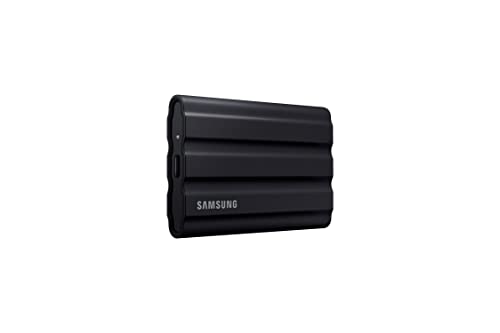
3. Samsung T7 Shield Portable SSD, 1TB
The T7 Shield takes the opposite approach. It is a portable USB SSD that can serve as a fast archive for either console, hold PS4 games in a playable state on PS5, and move between console, computer, and bag without installation. Samsung rates it at up to 1,050 MB/s over USB 3.2 Gen 2, and the Shield version adds an IP65 rating for dust and water resistance, suiting a drive that is handled and carried often.
What it cannot do matters just as much. A PS5 game stored on it must be copied back to internal storage or an installed M.2 drive before play, and a Series X|S game must be copied back to internal storage or an expansion card. Its value is fast archiving and flexibility, not direct play, and for a two console household that shared archive role is a real advantage over a platform locked card.
Specs
- Capacity: 1TB
- Drive type: Portable solid state drive
- Interface: USB 3.2 Gen 2
- Stated transfer speed: Up to 1,050 MB/s, confirm on the listing
- Durability rating: IP65 rated for dust and water resistance
- Model: MU-PE1T0S/AM, Black variant
- Included cables and exact console formatting steps: confirm on the listing
4. WD_BLACK P40 Game Drive SSD, 2TB
The P40 doubles the T7 Shield capacity here and raises the headline speed, with WD_BLACK listing up to 2,000 MB/s over USB 3.2 Gen 2×2 and compatibility across PlayStation, Xbox, PC, and Mac. It also adds customisable RGB lighting through the WD_BLACK Dashboard on Windows.
The console story is the same archive story as any USB drive, with one caution. Neither console exposes the full Gen 2×2 speed the P40 is built for, so transfer times are limited by the console port rather than the headline figure. Buy it for 2TB of portable archive space and cross platform flexibility, not for a promise that a console will use its full rated speed.
Specs
- Capacity: 2TB
- Drive type: Portable solid state drive
- Interface: USB 3.2 Gen 2×2
- Stated transfer speed: Up to 2,000 MB/s, confirm on the listing
- Features: RGB lighting, customisable through the WD_BLACK Dashboard on Windows
- Compatibility as listed: PlayStation, Xbox, PC, and Mac
- Model: WDBAWY0020BBK-WESN
- Included cables and exact console formatting steps: confirm on the listing
5. Seagate Game Drive for Xbox, 2TB
This portable hard drive is the capacity first option. At 2TB over USB, it holds a large Xbox library as a game vault, including older titles that can still be played from USB, while Series X|S games are stored here and moved back when you want to play them. Seagate lists it as Xbox certified and compatible with Xbox Series X, Xbox Series S, and all generations of Xbox One, with a built in green LED bar.
As a mechanical hard drive, it copies games more slowly than either SSD above, and that adds up with large titles. In return, it offers a simple archive that stays plugged in rather than travelling. It is also the most Xbox specific USB product here, so a mainly PS5 household should look at the Samsung or WD_BLACK SSDs instead.
Specs
- Capacity: 2TB
- Drive type: Portable mechanical hard drive
- Interface: USB 3.2 Gen 1, listed as USB 3.0
- Compatibility as listed: Xbox Series X, Xbox Series S, and Xbox One generations
- Certification: Xbox certified, officially licensed for Xbox
- Features: Built in green LED bar
- Model: STKX2000400
- Exact variant, packaging, and included contents: confirm on the listing
How to choose
Start with the platform rule, because it decides which products can do the job you want done. On Xbox Series X|S, games optimised for Series X|S can only be played from the internal drive or a licensed Storage Expansion Card. A USB drive can store those games and transfer them back, and can play Xbox One, Xbox 360, and original Xbox titles directly, but it cannot launch a Series X|S game in place.
On PS5, PS5 games can be stored on a compatible USB drive but must be copied back to the internal drive or an installed M.2 SSD before play. PS4 games are the exception and can be played directly from USB extended storage, so a USB drive is far more useful on PS5 if your library still holds many PS4 titles.
Next, choose capacity by how you manage your library, not by a single game. Rotating a handful of large titles can fit a 1TB card or SSD. Keeping many games installed, returning to older titles, or sharing a console points to 2TB or an internal upgrade. System software reserves part of every drive, so usable space is always lower than the headline capacity.
Then weigh SSD against hard drive. An SSD copies large games back much faster and is smaller for moving between rooms or devices. A hard drive offers a simple, larger stay at home archive, but slower transfers mean planning ahead rather than copying on impulse. For portability, an expansion card stays in one Xbox, while a portable SSD can archive for both consoles and work with a computer as well.
Who should skip
Skip every product here if your only goal is more playable PS5 storage and you have not considered an internal M.2 SSD, because no USB drive or Xbox card lets a PS5 game launch externally. Skip the expansion cards if you do not own an Xbox Series X|S. Skip a 1TB archive if you will fill it within a few installs. And skip external storage altogether if you play one or two games at a time and are comfortable deleting and redownloading titles.
FAQ
Can I play GTA VI directly from a USB drive on PS5 or Xbox Series X|S?
No. On both consoles, a current generation game must be played from internal storage, from a licensed Xbox expansion card on Xbox, or from an installed M.2 SSD on PS5. A USB drive can store the game and copy it back, which is still simpler than a fresh download in many homes, but it cannot launch it in place.
Can one external SSD work for both my PS5 and my Xbox Series X|S?
A USB SSD can archive across a two console household, but each console formats and manages game storage in its own way, so dedicate a drive, or a clear routine, to each system rather than swapping one library back and forth daily. Check each console’s formatting and capacity requirements before setup.
Is an expansion card better than a portable SSD for Xbox?
For playing Series X|S games without a copy step, yes, because only licensed cards and the internal drive can do that. For flexibility, a portable SSD is better, since it can archive for more than one platform and work with a computer. Many Xbox households eventually want one of each.
How much external storage should I buy for a growing library?
Choose based on how many large games you want ready at once, not on one launch alone. A 1TB product suits a focused rotation, while 2TB suits a household library and a mix of current and older games. If you regularly hit the limit, choose a larger archive or an internal upgrade.
Final verdict
For Xbox Series X|S owners, the cleanest answer to a launch as big as GTA VI is a licensed expansion card, and both the Seagate card and the WD_BLACK C50 deliver playable space with no copy back routine. For archiving, the Samsung T7 Shield is the compact, durable 1TB SSD choice, the WD_BLACK P40 is the larger 2TB SSD choice for a mixed household, and the Seagate Game Drive for Xbox is the stay at home 2TB hard drive vault. Match the drive to the platform rule first, and the rest becomes straightforward.
More from Amazon
Programs that pair well with the guide above. Offers and eligibility are set by Amazon and may change.
Free shipping on eligible items, Prime Video and more. Eligible new members can start with a free trial.
Start a Prime free trialAd-free music streaming. Eligible new subscribers can start with a free trial.
Try Music Unlimited freeA Prime membership for ages 18-24 with a trial period. Eligibility is set by Amazon.
See Prime for Young AdultsAudiobooks and podcasts to listen to on the go. Eligible new members can start with a free trial.
Try Audible freeAs an Amazon Associate we earn from qualifying purchases.
