
The best case fan for most PCs is the Arctic P12 for value, the Noctua NF-A12x25 for the quietest high-airflow cooling, and the Lian Li UNI Fan for RGB builds. For a typical gaming case, three intake fans in front and one exhaust at the rear covers it, and the choice mostly comes down to noise, static pressure and looks.
Our top picks


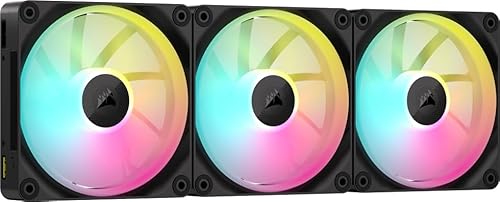

As an Amazon Associate we earn from qualifying purchases at no extra cost to you.
Quick comparison
| Pick | Best for | Key specs (per maker’s data) | Price range |
|---|---|---|---|
| Noctua NF-A12x25 PWM | Quietest, best overall | 2000 RPM, about 60 CFM, 22.6 dB(A), 6-year warranty | Premium |
| Arctic P12 PWM PST | Best value | About 56 CFM, 26.8 dB(A), sold in multipacks | Budget |
| Arctic P12 Pro | Radiators and high pressure | Up to 3000 RPM, about 77 CFM, loud at top speed | Budget to mid-range |
| Lian Li UNI Fan SL-Infinity 120 | RGB showcase builds | Daisy-chain connectors, about 56 CFM class | Mid-range |
| Noctua NF-P12 redux-1700 | Budget Noctua | Quiet, about half the cost of premium models | Budget to mid-range |
| Phanteks T30-120 | Performance | High static pressure for radiators and dense filters | Mid-range |
Best overall: Noctua NF-A12x25 PWM
Most roundups name it the top pick for noise-to-airflow balance. It has a long-life SSO2 bearing and a 6-year warranty. A second-generation G2 version is available. The trade-off is price and its brown-and-beige look.
Best value: Arctic P12 PWM PST
One shootout found it delivered roughly 90 percent of premium performance for a quarter of the cost, and multipacks reduce the per-fan price. It is louder than Noctua at high speed. The trade-off is that its bearing is not rated like premium models.
Best for radiators: Arctic P12 Pro or Phanteks T30
These push more pressure through dense radiators and filters but get loud at top speed.
Best RGB: Lian Li UNI Fan
Daisy-chained connectors keep wiring tidy and one controller handles lighting. It is noisier than Noctua and costs more per fan.
Worked example: airflow to cool a gaming PC
| Setup | Fans | Approx. airflow (CFM) |
|---|---|---|
| Minimal | 1 intake, 1 exhaust (56 CFM each) | Intake 56 / Exhaust 56 |
| Balanced | 3 intake, 1 exhaust | Intake 168 / Exhaust 56 plus passive vents |
| High airflow | 3 front, 3 top, 1 rear | Exhaust 224 / Intake 168 |
Total CFM is just fan CFM times the count at full speed. Real airflow drops through filters and mesh, so aim for equal or slightly higher intake than exhaust for positive pressure, which reduces dust.
How to choose
Airflow or static pressure?
Airflow fans suit open mesh fronts. High static pressure fans suit radiators, dust filters and heatsinks.
Check the connector
4-pin PWM allows speed control. Use a fan hub if you want more than your motherboard headers.
Size
120 mm is standard. 140 mm can be quieter at the same airflow, if your case supports it.
Noise
Lower RPM ranges and a fan curve in BIOS keep a PC quiet at idle.
Fan placement and fan curves
Placement matters as much as the fans themselves. In a standard airflow case, front and bottom fans bring cool air in while the rear and top fans push warm air out. Hot air rises, so a top exhaust fan removes heat that would otherwise sit near the CPU cooler. Set the fan curve in the BIOS or your motherboard software so that fans stay near 30 to 40 percent at idle and ramp up smoothly as CPU and GPU temperatures climb, which avoids annoying speed changes at the desktop.
Positive pressure, where intake airflow exceeds exhaust, forces air out through the case gaps and reduces dust buildup because the only air entering passes through filters. Negative pressure pulls in unfiltered dust through every gap.
Bearings, lifespan and noise
Fan bearings affect noise over time. Fluid dynamic and similar designs run quiet and last longer than sleeve bearings, which can get noisy once the lubricant dries. Premium manufacturers publish rated lifetimes and offer long warranties, such as Noctua’s six-year warranty on the NF-A12x25 line. Noise ratings in dB(A) are measured under lab conditions and vary by case, so use them to compare fans rather than predict exact room noise.
Common mistakes when buying case fans
Do not buy 3-pin fans if you want automatic speed control on every motherboard header, and do not chain too many RGB fans on one cable without checking the controller’s limit. Check the thickness too: 25 mm is standard, and 15 mm slim fans move less air. Finally, avoid pushing maximum RPM constantly; a fan running at 60 percent is often nearly silent and still moves most of the air.
Frequently Asked Questions
How many case fans do I need?
Two is the minimum. Three intake and one exhaust is common for gaming PCs.
Intake or exhaust?
Front and bottom as intake, rear and top as exhaust, with more intake than exhaust.
120 mm or 140 mm?
140 mm moves more air per rotation, so it can run slower and quieter, if the case has the mounts.
Are RGB fans worth it?
Only if your case shows them off. They add cost and sometimes noise.
How often should I clean fans?
Every few months with compressed air, more often in dusty rooms.





