
A laptop with two USB ports is a laptop that makes you choose between charging a phone and connecting a drive. For anyone with a desktop that buries its front-panel ports behind a monitor arm, or a MacBook that ships with one usable port, the fix is a quality hub that doesn’t throttle bandwidth, introduce lag under load, or fail after three months of daily use. ORICO has built a reputation in this category by offering aluminum housings at price points well below premium alternatives, but the lineup spans everything from a $14 slim stick to a $145 industrial station, and the differences in port count, cable length, and power delivery matter more than most shoppers expect.
What separates a good ORICO hub from a mediocre one comes down to three things: whether the internal controller maintains stable throughput when all ports are active, whether the cable length and connector type match your physical setup, and whether the power delivery is sufficient for the devices you plug in. Owner reviews consistently flag the same failure modes — dropped connections on mobile hard drives, inconsistent behavior with USB-C charging ports, and cheap plastic housings that flex and crack. The models below all use aluminum casings, which addresses the most common complaint, but they solve different problems. This guide sorts them by use case so you can match the spec to the desk.
Our top picks
 ORICO 7-Port USB 3.0 Hub
- 【7-in-1 Connectivity Multiport USB Adapter】This high-performance ORICO 7-Ports…
- 【Premium-Grade Materials for Long-Lasting Durability】Crafted from top-tier aluminum…
- 【Extra Power Port for High-Performance Devices】This USB 3.0…
 ORICO USB Hub 3.0
- New Clampable Hub Design: ORICO mountable usb hub…
- Extra Power Supply Port: This desk USB Hub…
- USB-C Expander: This usb c extension connect to…
 ORICO USB 3.0 Hub
- 4-port at Same Time-The small and speedy USB…
- 5Gbps Data Transfer-With high efficient USB3.0,This ORICO 4-port…
- Perfect Protection&Durability-With years of experience in multiple port…
| Product | Key specs | |
|---|---|---|
| ORICO 7-Port USB 3.0 Hub | 【7-in-1 Connectivity Multiport USB Adapter】This high-performance ORICO 7-Ports… 【Premium-Grade Materials for Long-Lasting Durability】Crafted from top-tier aluminum… 【Extra Power Port for High-Performance Devices】This USB 3.0… | Check price |
| ORICO USB Hub 3.0 | New Clampable Hub Design: ORICO mountable usb hub… Extra Power Supply Port: This desk USB Hub… USB-C Expander: This usb c extension connect to… | Check price |
| ORICO USB 3.0 Hub | 4-port at Same Time-The small and speedy USB… 5Gbps Data Transfer-With high efficient USB3.0,This ORICO 4-port… Perfect Protection&Durability-With years of experience in multiple port… | Check price |
 ORICO 7-Port USB 3.0 Hub ORICO 7-Port USB 3.0 Hub | 【7-in-1 Connectivity Multiport USB Adapter】This high-performance ORICO 7-Ports… 【Premium-Grade Materials for Long-Lasting Durability】Crafted from top-tier aluminum… 【Extra Power Port for High-Performance Devices】This USB 3.0… | Check price |
 ORICO USB 3.0 Hub ORICO USB 3.0 Hub | Clamp Usb Hub: ORICO USB Hub designed with… Extra Power Supply Port: This desk USB Hub… 5Gbps Data Transfer Speed: Expand 4 USB 3.0… | Check price |
 ORICO 7-Port USB 3.2 Gen2 Hub ORICO 7-Port USB 3.2 Gen2 Hub | 【Sleek Apple-style Design】ORICO 7-Ports USB 3.2 Hub ideal… 【USB3.2 Gen 2 Data Transfer Speed】This USB 3.2… 【Powerful and Secure Power Adapter 】ORICO 7 ports… | Check price |
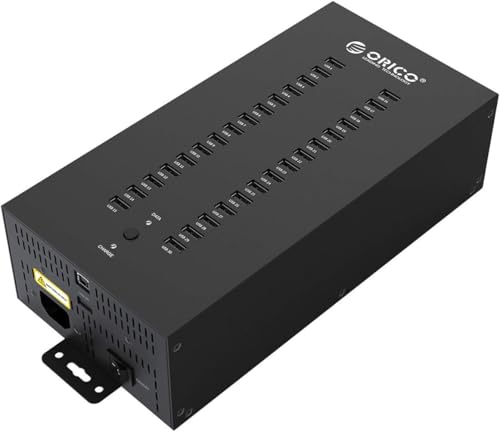 ORICO 30-Port Industrial-Grade USB 2.0 Hub with ORICO 30-Port Industrial-Grade USB 2.0 Hub with | 【Dual-Mode Industrial USB Hub】Two operating modes—data transmission and… 【30-Port USB Expansion】Sync and charge up to 30… 【300W Integrated Power Supply】Equipped with a 300W integrated… | Check price |
 ORICO 7-Port USB 3.0 Hub ORICO 7-Port USB 3.0 Hub | 【7-in-1 Connectivity Multiport USB Adapter】This high-performance ORICO 7-Ports… 【Premium-Grade Materials for Long-Lasting Durability】Crafted from top-tier aluminum… 【Extra Power Port for High-Performance Devices】This USB 3.0… | Check price |
As an Amazon Associate we earn from qualifying purchases at no extra cost to you.
Quick Picks
| Product | Best For | Price |
|---|---|---|
| ORICO 7-Port USB 3.0 (1.64Ft) | Desktop users with front-panel ports nearby | $15.19 |
| ORICO Clamp USB Hub 3.0 | Desk-edge mounting with mixed USB-C peripherals | $25.99 |
| ORICO 4-Port USB 3.0 (6Ft) | Laptop users who need a long, slim cable | $14.39 |
| ORICO 7-Port USB 3.0 (3.28Ft) | General-purpose desktop expansion | $17.09 |
| ORICO Clamp USB Hub 4-Port (4.92Ft) | Monitor-mounted setups needing extra power | $19.99 |
| ORICO 7-Port USB 3.2 Gen2 (Powered) | MacBook and iMac users needing PD and 10Gbps | $42.89 |
| ORICO 30-Port Industrial Hub | Offices, workshops, and labs with mass charging needs | $145.99 |
| ORICO 7-Port USB 3.0 (6Ft) | Cable management across large desks or floor placement | $22.09 |
How We Picked
We compared published port configurations, bandwidth ratings, cable lengths, power delivery specs, and materials across the lineup, then cross-referenced with aggregate owner feedback on reliability and real-world throughput. The four criteria that matter most in this category are: stable multi-device performance (not just peak single-port speed), cable length matched to your physical setup, power delivery appropriate for the connected devices, and build quality that resists flex and heat. ORICO hits strong marks on value across the range, but the right model depends entirely on which of those four factors is your bottleneck.
The 8 Best ORICO USB Hub in 2026
ORICO 7-Port USB 3.0 (1.64Ft) — $15.19
The most affordable entry in ORICO’s 7-port lineup, this hub delivers 5Gbps per port in an aluminum casing for just over fifteen dollars. It suits desktop users whose computer sits close to the desk edge and who need to expand a single front-panel or rear USB-A port into a small cluster for flash drives, keyboards, and a mobile HDD.
- Seven full-speed USB 3.0 ports at the lowest price in the 7-port tier
- Aluminum housing dissipates heat better than the plastic alternatives in this price bracket
- The 1.64-foot cable is short; you must place the hub within reach of the port it plugs into
Skip this if your computer tower lives on the floor or the port you’re expanding sits behind a monitor stand. The cable will leave you with a dangling hub or an unflappable reach.
ORICO Clamp USB Hub 3.0 — $25.99
ORICO’s clamp-mount design attaches to desk edges or monitor arms, keeping the hub off your work surface. It provides three USB-A data ports plus one USB-C port for displays or charging, with an extra power supply port for bus-powered devices that draw more current than a single upstream port can supply. Owner feedback highlights the clamp’s grip strength as more reliable than cheaper alternatives.
- Mixed port types (USB-A and USB-C) handle both legacy and modern peripherals
- Integrated power supply port prevents low-power warnings on mobile hard drives
- At $25.99 for four ports, the cost per port is higher than ORICO’s 7-port basic models
Skip this if you don’t need a clamp mount and primarily use USB-A devices; a standard 7-port hub gives you more ports for less money.
ORICO 4-Port USB 3.0 (6Ft) — $14.39
A slim, low-profile hub with a six-foot cable, designed for laptop users who want to keep their desk uncluttered. The ultra-slim body tucks under a laptop stand or behind a monitor without creating a visible bump, and the long cable reaches from a laptop across a wide desk to a tower or dock. Owners praise the form factor as the best compromise between port count and footprint.
- The 6-foot cable eliminates the reach problem that plagues shorter hub designs
- Ultra-slim aluminum body disappears under a laptop or behind a monitor
- Only four ports — one less cluster than the 7-port basic model, and no extra power input
Skip this if you regularly connect more than four devices simultaneously; you’ll hit the port limit before you hit the bandwidth ceiling.
ORICO 7-Port USB 3.0 (3.28Ft) — $17.09
The middle-ground 7-port model with a three-and-a-quarter-foot cable, this hub balances port density with reach at a modest price increase over the 1.64-foot version. It works well for desktop users whose tower sits on the desk or a short pedestal, giving enough slack to route the cable without tension while keeping the hub within arm’s reach.
- Seven USB 3.0 ports at 5Gbps for under $18 make it a strong value for multi-device setups
- The 3.28-foot cable adds useful routing flexibility without the excess length of longer models
- No dedicated power input; heavy bus-powered HDDs may cause instability when all ports are active
Skip this if your tower sits on the floor more than three feet from your desk edge; the cable won’t bridge that gap comfortably.
ORICO Clamp USB Hub 4-Port (4.92Ft) — $19.99
Similar in concept to the $25.99 clamp model but with a longer 4.92-foot cable and no included power adapter, this hub targets users who want desk-edge mounting and flexible positioning. The aluminum four-port splitter includes an extra power supply port for devices that need more current than the USB bus provides. Owner reviews note the cable length allows placement on either side of a monitor or at a different desk edge than the upstream port.
- Nearly five feet of cable gives more routing freedom than any other clamp-mount option here
- Power supply port supports bus-powered drives without a separate adapter in basic configurations
- No power adapter is included; you’ll need to supply your own for the full effect
Skip this if you want a turnkey experience and don’t own a compatible USB-C power adapter already; the $25.99 sibling handles the basics better out of the box.
ORICO 7-Port USB 3.2 Gen2 (Powered) — $42.89
This is the performance flagship in the consumer lineup. With USB 3.2 Gen2 delivering 10Gbps per port, four USB-A and two USB-C outputs, 60W power delivery passthrough, and a 72W power adapter in the box, it handles high-speed NVMe enclosures, 4K displays via USB-C, and a MacBook charging simultaneously. The 1.64-foot cable includes both USB-C and USB-A connections, making it compatible with MacBooks, iMacs, and Mac minis without dongles.
- 10Gbps bandwidth doubles what USB 3.0 hubs offer, future-proofing for fast external SSDs
- 60W PD passthrough charges a MacBook while all six data ports remain active
- At $42.89 it costs nearly triple the basic 7-port models, and the 1.64-foot cable limits placement
Skip this if your peripherals are flash drives, keyboards, and mice; you’re paying for bandwidth and PD you’ll never saturate.
ORICO 30-Port Industrial Hub — $145.99
A rack-mountable, wall-mountable charging and data station with thirty USB 2.0 ports, a 300W power supply, and a full metal case. This isn’t for a home desk; it’s built for device farms, IT departments, QA labs, and workshops where dozens of phones, tablets, or small peripherals need simultaneous charging or data transfer. The smart charging function distributes current across ports to prevent overloading the supply.
- Thirty ports in a single rack-mountable unit replaces an entire shelf of individual chargers
- Full metal case and 300W supply are built for continuous 24/7 operation in shared environments
- USB 2.0 only — data throughput is limited to 480Mbps per port, so it’s a charging station first and a hub second
Skip this for personal use. The price, form factor, and USB 2.0 constraint only make sense if you manage more than ten devices at once in a professional setting.
ORICO 7-Port USB 3.0 (6Ft) — $22.09
The longest-cable variant of the 7-port USB 3.0 hub, offering 5Gbps across seven aluminum-housed ports with a full six-foot reach. This model solves the spatial problem: place your tower on the floor, route the cable along the desk leg, and keep all seven ports at hand’s length. Owner feedback consistently recommends this cable length for tower-on-floor desktops and for anyone who prefers the hub mounted to the desk surface rather than dangling from a rear port.
- Six-foot cable is the longest reach available in the 7-port tier, eliminating placement constraints
- Seven USB 3.0 ports in aluminum at $22.09 remains competitive against multi-brand alternatives
- No power input port; if you connect two mobile HDDs plus a webcam, voltage drop is possible
Skip this if your setup is tight and a three-foot cable already reaches; the excess length becomes a management problem rather than a solution.
Buying Guide
Cable Length Is the Most Underrated Spec
The difference between a 1.64-foot cable and a six-foot cable isn’t convenience — it’s whether your setup functions at all. If your desktop tower sits on the floor and you want the hub on the desk, you need at least three to four feet of cable to route cleanly without tension. If your laptop is docked behind a monitor, a short cable keeps the hub invisible. Measure the distance from the port you’re expanding to where you want the hub before ordering. This single mismatch accounts for the majority of one-star reviews on short-cable models.
USB 3.0 vs. 3.2 Gen2 vs. USB 2.0: Match Bandwidth to Devices
USB 2.0 at 480Mbps is fine for keyboards, mice, and charging. USB 3.0 at 5Gbps handles flash drives, external HDDs, and most webcams without bottleneck. USB 3.2 Gen2 at 10Gbps is where you enter the territory of fast NVMe enclosures, 4K capture cards, and multiple high-speed drives pulling data simultaneously. If none of your devices exceed 5Gbps, paying for Gen2 bandwidth is wasted. Conversely, plugging a 10Gbps SSD into a USB 2.0 hub caps transfer speeds to roughly one-tenth of what the drive can achieve.
Power Delivery and Bus-Powered Device Stability
Every USB port on a hub draws power from the upstream connection. A bus-powered hub splitting one port into seven shares that single power budget, and mobile hard drives demand the most current of typical peripherals. When three or more HDDs are connected simultaneously, voltage drops cause disconnections, slow performance, or visible warning messages in the OS. Hubs with an extra power supply port — like the clamp models and the 3.2 Gen2 unit — inject external current and eliminate this failure mode. If your device mix includes two or more bus-powered drives, prioritize a hub with a power input regardless of port count.
Our Verdict
For the most users connecting keyboards, flash drives, and an occasional external HDD, the ORICO 7-Port USB 3.0 with the 3.28-foot cable at $17.09 offers the best balance of port count, reach, and price. The budget pick goes to the 4-Port USB 3.0 with the 6-foot cable at $14.39, which is the cheapest way to get reliable aluminum build and long reach without overcommitting to seven ports you won’t use. If you drive a MacBook with USB-C only and need to charge it while running a 4K monitor and a fast SSD, the 7-Port USB 3.2 Gen2 at $42.89 wins despite the premium because nothing else in this list provides 60W passthrough and 10Gbps simultaneously.
FAQ
Can an ORICO USB hub power a laptop?
Only the USB 3.2 Gen2 model with PD passthrough delivers enough wattage (60W) to charge a MacBook or similar laptop. The other hubs in this lineup are bus-powered data splitters and cannot supply meaningful charging current to a host laptop.
Why do my external hard drives disconnect when I use multiple ports?
This is a voltage drop issue. A bus-powered hub shares one power source across all ports, and mobile HDDs draw more current than flash drives or keyboards. When several power-hungry devices are active, the voltage falls below the drive’s minimum and it disconnects. Hubs with an external power input eliminate this by adding a separate current source.
Is USB 3.2 Gen2 backward compatible with USB 3.0 and 2.0 devices?
Yes. A USB 3.2 Gen2 hub accepts USB 3.0 and 2.0 devices without adapters and operates them at their native speeds. The Gen2 rating only applies to ports or devices that support it; everything else falls back to the highest speed both sides can negotiate.
Are clamp-mount hubs as stable as desk-sitting hubs?
Owner feedback on ORICO’s clamp models indicates strong grip on standard desk thicknesses up to about two inches, with no reported slipping during normal use. They are slightly less stable than a hub sitting flat on the surface if you frequently yank cables, but for a fixed setup they free desk space without tradeoffs in reliability.









