To connect a Netgear extender to your router, plug the extender in about halfway between the router and the dead zone, then either press the WPS button on the extender and on the router within two minutes, or join the extender’s own Wi-Fi network (usually named NETGEAR_EXT) and open mywifiext.net or 192.168.1.250 in a browser to run the setup wizard and enter your Wi-Fi password. The browser method works with every router; WPS is faster but fails on many modern routers that have it disabled or run WPA3-only security.
Below are both methods step by step, how to read the LEDs to place it correctly, and fixes for the most common reasons a Netgear extender will not connect to a router.
Our top picks
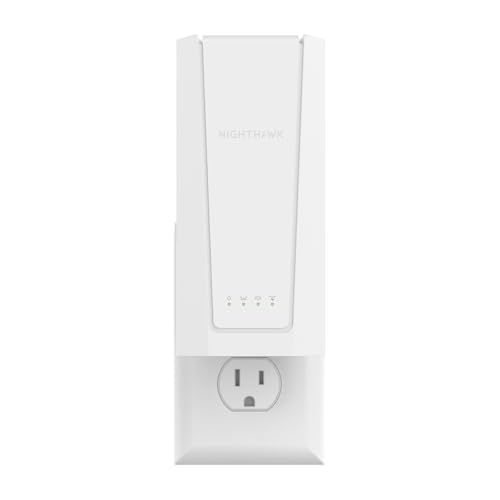
 NETGEAR WiFi Extender EX5000
- DEAD ZONES, ELIMINATED: Bring WiFi 5 to the…
- Use the NETGEAR Nighthawk app for guided setup,…
- Keep HD video, calls, and everyday devices smooth…


As an Amazon Associate we earn from qualifying purchases at no extra cost to you.
Before you start
- Know your router’s Wi-Fi network name (SSID) and password for each band. If your router uses one name for both 2.4 and 5 GHz (Smart Connect or band steering), that is fine.
- Do the first setup in the same room as the router. Move the extender to its final spot afterward; this avoids a weak signal causing a failed setup.
- Have a phone or laptop with Wi-Fi. A laptop with an Ethernet port also works on extenders that have a LAN port.
- Turn off mobile data and any VPN on your phone during setup. Phones often route the setup page over cellular when the extender has no internet yet.
Method 1: WPS (one-button setup)
- Plug in the extender near the router and wait until the Power LED is solid green, usually 1 to 2 minutes.
- Press the WPS button on the extender. The WPS LED blinks.
- Within 2 minutes, press the WPS button on the router. On some routers it is labeled with two curved arrows; on others it is a setting in the router app.
- Wait for the extender’s Router Link LED to turn on. Dual-band extenders may need you to repeat the process for the second band.
- The extended network usually takes the name of your router network with _EXT added, using the same password, unless the extender model supports one-SSID mode.
If nothing happens after 2 minutes, WPS is probably disabled on the router, or the router uses WPA3 only. Use Method 2.
Method 2: Browser setup through mywifiext.net
- Plug in the extender and wait for a solid Power LED.
- On your phone or laptop, open Wi-Fi settings and connect to the extender’s network, usually NETGEAR_EXT. It has no password at this stage.
- Open a browser and go to http://mywifiext.net. If that does not load, use http://192.168.1.250.
- Select New Extender Setup, accept the terms and create an admin login. Store this; you need it to change settings later.
- Let the extender scan. Choose your router’s 2.4 GHz and 5 GHz networks (or the single combined name).
- Enter your router’s Wi-Fi password exactly. It is case-sensitive.
- Choose the name for the extended network. Keeping the default _EXT name makes troubleshooting easier because you can see which device you are connected to.
- Reconnect your device to the new extended network and confirm internet access.
Some newer Netgear extenders and mesh extenders can also be set up through the Nighthawk app, which follows the same steps on a phone.
Place it using the Router Link LED
After setup, move the extender to a spot roughly halfway between the router and the area with poor coverage. Netgear extenders use a Router Link LED to show signal from the router:
| Router Link LED | Meaning | What to do |
|---|---|---|
| Solid green | Best connection | Keep it here, or try moving 5–10 ft further out for more reach |
| Solid amber | Good connection | Acceptable for most use |
| Solid red | Poor connection | Move closer to the router |
| Off | No connection | Check password, then re-run setup |
Exact LED behavior varies a little by model, so check the label or quick-start sheet for yours.
Why halfway matters: a quick speed estimate
A wireless extender receives and retransmits on the same radios, so on a single-band link it can roughly halve the throughput it receives. If the router delivers about 200 Mbps at the extender’s spot, a dual-band extender may pass on around 100 to 150 Mbps. If you place it at the edge of coverage where it receives only 40 Mbps, devices behind it may see 20 Mbps or less. Placing it closer to the router keeps the input speed high.
| Signal at extender location | Typical router-to-extender speed | Likely speed for devices behind extender |
|---|---|---|
| Strong (same floor, 1 wall) | 250–400 Mbps | 120–250 Mbps |
| Medium (2–3 walls) | 100–200 Mbps | 50–120 Mbps |
| Weak (far end of home) | 20–60 Mbps | 10–30 Mbps |
These are typical ranges for Wi-Fi 5 and Wi-Fi 6 dual-band extenders; real figures depend on the router, walls and interference.
Netgear extender not connecting to router: fixes
The setup page will not open
- Make sure you are connected to NETGEAR_EXT, not your router’s network.
- Type http:// and the address exactly; do not search it.
- Turn off mobile data and VPN, or try a laptop instead of a phone.
- Try a different browser or a private window to avoid cached redirects.
It accepts the password but never connects
- WPA3-only routers: Older extenders do not support WPA3. Set the router to WPA2/WPA3 mixed (transition) mode.
- Special characters in the password: Rare, but some older firmware mishandles certain symbols. Test with a simpler temporary password.
- MAC filtering or access control: If the router only allows listed devices, add the extender’s MAC address (printed on its label).
- Hidden SSID: Use the manual network entry option in the wizard.
It connects, then devices get no internet
- Restart the router, then the extender, in that order.
- Check the router’s DHCP pool is not full; some routers default to small pools of 50 addresses.
- Update the extender firmware from its admin page.
It keeps dropping
- Move it closer to the router until the Router Link LED is green or amber.
- Avoid placing it behind a TV, on a metal shelf or next to a microwave.
- If your router uses DFS channels on 5 GHz, try a fixed non-DFS channel such as 36 to 48 or 149 to 161; some extenders reconnect slowly after DFS channel changes.
Factory reset as a last resort
Use a paperclip to press and hold the recessed Reset or Factory Settings button for several seconds until the Power LED blinks, then release. The extender reboots with default settings and you can run setup again.
Wired option: access point mode
Many Netgear extenders with an Ethernet port can run in access point mode. Connect an Ethernet cable from the router to the extender, choose access point mode in setup, and the extender broadcasts Wi-Fi without the wireless speed penalty. If you can run a cable or use powerline or MoCA adapters, this beats wireless extension every time.
When an extender is not the right fix
If you need to cover more than one dead zone, or the extender cannot get a green or amber link anywhere useful, a mesh system (Wi-Fi 6, 6E or Wi-Fi 7) with a dedicated backhaul usually gives faster, more stable coverage and a single network name. Extenders remain a sensible low-cost fix for one weak room.
More from Amazon
Programs that pair well with the guide above. Offers and eligibility are set by Amazon and may change.
Free shipping on eligible items, Prime Video and more. Eligible new members can start with a free trial.
Start a Prime free trialAd-free music streaming. Eligible new subscribers can start with a free trial.
Try Music Unlimited freeA Prime membership for ages 18-24 with a trial period. Eligibility is set by Amazon.
See Prime for Young AdultsAudiobooks and podcasts to listen to on the go. Eligible new members can start with a free trial.
Try Audible freeAs an Amazon Associate we earn from qualifying purchases.